
Jev Chat Assistant – Open-Source AI Chat Companion for Generating the Most Appropriate Responses
Executive Summary:
Jev Chat Assistant is an open-source, non-intrusive AI chat assistance application that provides real-time reply suggestions in popular messaging scenarios such as WeChat, QQ, X, and Feishu. The tool ...
1. What is Jev Chat Assistant
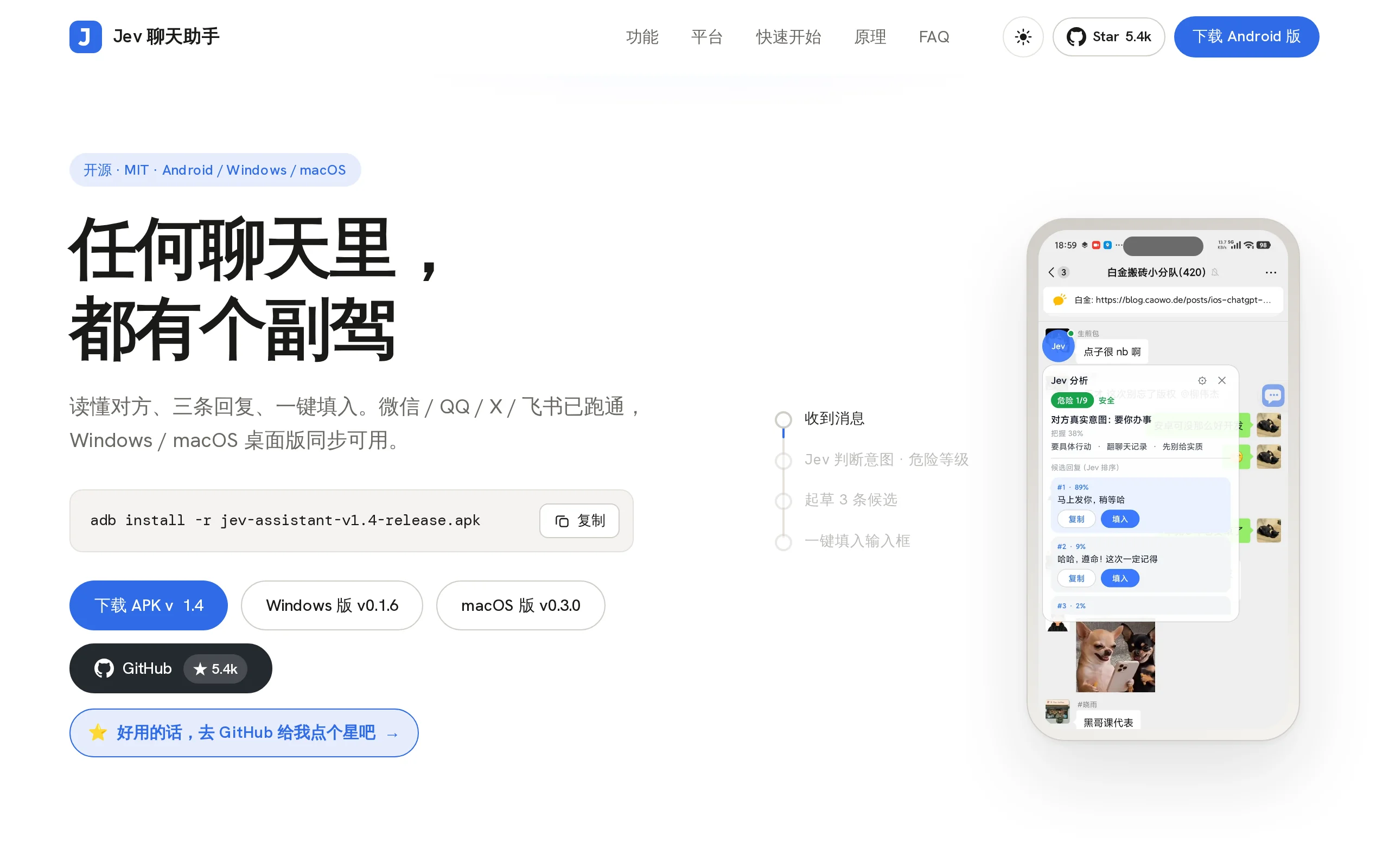
Jev Chat Assistant is an open-source, non-intrusive AI chat assistance application that provides real-time reply suggestions in popular messaging scenarios such as WeChat, QQ, X, and Feishu. The tool reads screen chat content through accessibility services or offline OCR technology. First, an analysis model determines the other party's intent and risk level, then generates three candidate replies sorted by appropriateness. Users can一键 (one-click) input the selected reply into the chat box, but the tool only fills in the text and does not send it automatically—ensuring that the final decision to send remains with the user. Jev Chat Assistant supports Android, Windows, and macOS platforms, storing keys only locally to ensure privacy and security.
Image source: Official article
Image source: official article
Technical positioning and domain: This falls within the intersection of natural language processing and intelligent chat assistance, focusing on intent understanding, risk assessment, and reply generation in real-time chat scenarios. Its unique positioning lies in the "first assess, then respond" decision pipeline, distinguishing it from traditional AI keyboard tools that are purely generative in nature.
Development background: Developed by the Jev team, the project is open-sourced and hosted on GitHub under the jev-chat organization. The motivation for development stems from common pain points in daily chatting, such as "words not matching intent" and "misunderstanding the context." The team chose a non-intrusive architecture to avoid modifying the chat application or accessing its database, achieving a balance between compliance and practicality.
Core value: It addresses the dual issues of inadequate appropriateness in chat replies and the difficulty of balancing privacy and security. By quantifying conversation risks (1–9 levels) through an intent analysis model, it helps users identify manipulation tactics and potential conflicts. At the same time, the "fill only, do not send" mechanism eliminates the risk of accidental sending, returning the final decision-making power to the user.
Technical features: It employs a three-tier independent interface architecture combining "judgment model + generation model + visual model," compatible with mainstream services such as OpenRouter, DeepSeek, and Tongyi. The data collection layer primarily uses accessibility services, with offline OCR as a fallback, ensuring that content can still be obtained via local recognition (ML Kit / RapidOCR) when control text cannot be read. Images are not uploaded, and the tool remains functional even when offline.
2. Key Features
Intent Analysis: Analyze the true intent, risk level (1–9), and optimal response action of the other party's message within approximately 1 second, along with the model's confidence level. This feature provides a pre-decision basis for response generation, preventing users from hastily replying in inappropriate contexts. It is especially suitable for high-risk conversation scenarios such as workplace reporting and business negotiations.
Candidate Response Generation: The generative model (default: DeepSeek) drafts 3 conversational responses for the user to choose from. The generation process integrates the output from the intent analysis phase, ensuring that the candidate responses align in style and content with the current context, rather than being generic template text.
Smart Ranking: Reorders the 3 candidate responses based on the "most appropriate" standard, providing the percentage allocation and recommendation rationale for each response. The ranking logic considers factors such as semantic match, tone alignment, and risk mitigation, helping users quickly identify the optimal choice.
One-Click Insertion: Clicking on a candidate response inserts it into the chat input box, but the program will never automatically send it. This design completely separates "suggestion" from "execution," allowing users to edit or discard the inserted response as needed, thereby preventing accidental incorrect sends at the system level.
Screen Capture: Utilizes accessibility services to read the conversation content. When system controls cannot expose the text, it automatically switches to a screenshot OCR solution as a fallback. This dual-channel capture mechanism ensures stable acquisition of conversation context across different application environments such as WeChat, QQ, X, and Feishu.
Offline OCR: Uses local recognition engines from ML Kit and RapidOCR to extract text without uploading image data to the cloud, enabling text extraction without internet connectivity. This feature is particularly useful in low-network conditions, sensitive scenarios, or when dealing with private screenshots, balancing recognition efficiency with data security.
Knowledge Base Integration: Maintains local notes and contact records, automatically incorporating relevant background information during analysis. For example, when the other party mentions a specific project name, Jev can use the local notes to understand the context, making the generated responses more targeted.
Contact Management: Records contact relationships, nicknames, and notes, supporting cross-app association for the same contact. This feature provides a relational dimension reference for intent analysis; for instance, the same message would have entirely different response strategies depending on whether the contact is a "partner" or a "client."
Customizable Interfaces: The judgment, response, and visual processing interfaces are independently configurable, compatible with mainstream services such as OpenRouter, DeepSeek, and Tongyi. Users can combine different models as needed, for example, using DeepSeek for response generation and Tongyi for visual tasks, avoiding dependency on a single vendor.
Conversation Whitelist: Supports keyword filtering, enabling automatic analysis only for specific conversations. This feature prevents frequent triggering of analysis in irrelevant group chats or low-frequency conversations, reducing unnecessary computational costs and disturbances.
3. How to Use
Environment Requirements: The Android version requires Android 11 or higher; the Windows version supports v0.1.6, and the macOS version supports v0.3.0. All three versions share the same core, but you must download the corresponding installation package for each platform separately.
Download and Installation: Download the appropriate version from the official website https://chatjevs.com/ or the GitHub release page. Android users can install the APK directly or use the command
adb install -r jev-assistant-v1.3-release.apk; Windows and macOS users should extract the files and run the application. For unsigned versions, select "Run Anyway" in the system prompt or open it by right-clicking.Configure API Keys: Open Settings → Interface, and enter your OpenRouter API Key. Leaving other interfaces empty will automatically inherit the default configuration. You can also configure API keys for DeepSeek, Tongyi, and other services separately, enabling independent routing across the three interfaces.
Connectivity Test: Click the 「Connectivity Test」 button to confirm that the judgment, response, and visual interfaces can connect normally. This step can help identify API key configuration errors or network issues in advance, preventing disruptions during later use.
Set Relationship Description: Enter your relationship with the other party in the 「Relationship Description」 field (e.g., "The other person is my partner"). This helps Jev more accurately determine the message intent and response strategy. This information is stored only locally and will not be uploaded.
Enable Automatic Analysis: Turn on the 「Automatically Analyze When the Other Person Sends a Message」 toggle. You can also set a conversation whitelist to define the scope of where this feature is active. The whitelist supports keyword filtering, enabling automatic analysis only for matching conversations.
Grant Permissions: Enable the accessibility service and floating window permissions. Xiaomi and HyperOS users also need to enable auto-start and battery optimization exemptions to ensure stable background service operation.
Start Using: Open any chat application (WeChat, QQ, X, etc.). When the other person sends a message, the floating window will automatically pop up with the analysis results. Choose one of the three candidate replies and click 「Insert」. After the reply is entered into the input box, you can edit it as needed. Finally, manually click the send button in the chat application to send the message.
4. Pros and Cons Analysis
| Pros |
|---|
| Judgment before Response: Analyzes the user's true intent and risk level (1–9) using an intent judgment model before generating a reply, making the decision-making process more aligned with real-world conversation scenarios and reducing the likelihood of misunderstanding. |
| Non-intrusive Design: Does not modify the chat app's installation package, does not hook into system processes, and does not access the database. It only retrieves content through accessibility screen readers and screenshots, ensuring safer and more compliant usage and reducing the risk of being banned. |
| User retains Sending Control: Only fills the reply into the input box and never sends it automatically. It also avoids sensitive operations such as transfers, red packets, and payments, preventing accidental operations at the system level. |
| Works with Any App: Uses both accessibility and OCR channels for content collection, supporting apps like WeChat, QQ, X, and Feishu. New apps can be integrated with just a few dozen lines of adaptation code. |
| Offline OCR as a Backup: Uses local OCR recognition with ML Kit or RapidOCR, without uploading image data. It can still extract text in offline or sensitive scenarios, ensuring basic usability. |
| Fully Open Interface: Judgment, response, and visual processing modules can be independently configured. OpenRouter, DeepSeek, and Tongyi can be switched with one click, avoiding dependency on a single model provider and offering high flexibility. |
5. Comparative Analysis with Similar Tools
| Comparison Dimension | Jev Chat Assistant | iFlytek Input Method (AI Keyboard) | WeChat Input Method |
|---|---|---|---|
| Product Positioning | Independent conversational assistant app, floating window attached to the chat | AI capabilities built into the input method, providing assistance while typing | AI writing assistance built into the input method |
| Intent Recognition | First determine intent + risk level 1–9 + action recommendations, then generate the response | Scenario recognition based on the Spark Large Model, focusing on generation rather than risk assessment | Text generation based on the HunYuan Large Model, no risk categorization |
| Conversation Reading Method | Accessibility screen reader + offline OCR, can read the complete message sent by the other party | Cannot read conversation context, mainly relies on keyword联想 based on user input | Cannot read conversation context, only based on current input content |
| Supported Chat Apps | WeChat, QQ, X, Feishu, and any App | All Apps (as an input method), but with weak context understanding | All Apps (as an input method), with weak context understanding |
| Response Generation | The generation model drafts 3 responses, ranks them by appropriateness with percentages and rationale | AI keyboard provides auto-writing / smart replies, scenario assistants for high EQ communication, etc. | AI writing assistant, provides continuation and polishing |
| Sending Control | Only fills the input box, never sends automatically | Generated content is displayed on screen, user sends manually | Generated content is displayed on screen, user sends manually |
| Knowledge Base / Contacts | Local knowledge base + contact profiles, cross-App association | Personalized skill sets, custom quotes, no semantic contact memory | No contact memory, no local knowledge base |
| Model Selection | Fully open interface (choose from OpenRouter, DeepSeek, Tongyi, etc.) | Bound to iFlytek Spark Large Model, cannot be changed | Bound to HunYuan Large Model, cannot be changed |
Selection Recommendations: If the user's primary need is to "understand the other party's intent and mitigate communication risks," and they require cross-platform support (Android / Windows / macOS), Jev Chat Assistant is currently the most comprehensive open-source option in terms of feature coverage. Its intent recognition and risk categorization mechanisms are significantly differentiated from similar tools. If the user only needs real-time text polishing or continuation suggestions while typing, and is not concerned about being tied to a single model provider, the AI keyboard features of iFlytek Input Method or WeChat Input Method can meet the requirements without the need to install a separate application.
For technically oriented users who value data privacy and model flexibility, Jev's open interface design and local OCR solution are more appealing. However, for general users who prioritize zero-configuration and out-of-the-box usability, the built-in AI keyboard solutions in input methods have lower learning costs, albeit with limitations in context understanding.
6. Editor's Summary
Jev Chat Assistant has chosen a differentiated technical approach in the dialogue assistance space: the "first assess, then respond" decision pipeline places intent understanding and risk quantification upfront, making response generation no longer an isolated text generation task, but a comprehensive decision based on the dialogue context and relational dimensions. This design holds practical value in scenarios with high demands for appropriateness, such as workplace communication and maintaining close relationships. Particularly, the "risk level 1–9" quantification mechanism provides users with an intuitive reference for communication risks, which is relatively rare among similar open-source tools.
From an architectural perspective, the design of three independently configurable interfaces reflects a strong emphasis on the openness of the model ecosystem. Users can freely combine judgment, generation, and visual models without being tied to a single vendor, aligning with the current trend of "Lego-style" integration in AI toolchains. The non-intrusive data collection approach (Accessibility + OCR) achieves a balance between compliance and universality, avoiding the risk of being banned due to modifications to chat applications while ensuring usability in low-network environments through offline OCR.
In terms of practical value, Jev's "fill but not send" mechanism is commendable in its interaction design—it positions AI as a "advisor" rather than an "executor," effectively eliminating the risk of accidental message sending. This restrained design philosophy stands out as particularly rational in an industry that is increasingly focused on automation. The introduction of a local knowledge base and contact profiles moves response generation from a "generalized" approach toward "personalized" one, although the maintenance cost of the knowledge base may become a barrier for regular users to continue using it.
In terms of target users, Jev is more suitable for individuals who have high demands for communication quality and are willing to invest time in configuration, including professionals in the workplace, operation staff with frequent social interactions, and privacy-conscious tech enthusiasts. For ordinary users seeking zero-configuration options, built-in solutions within input methods remain a more convenient choice.
In terms of growth potential, the open-source model provides Jev with a community foundation for iteration. In the future, if it can enhance its ability to read conversation streams on desktop platforms, reduce the maintenance cost of the knowledge base, and introduce more local small model options, its appeal to privacy-sensitive user groups will further increase. Overall, Jev is an open-source dialogue assistance tool that stands out both in concept and implementation, and it is definitely worth paying attention to.
7. Application Scenarios
Workplace Communication: When receiving messages from a supervisor or client, first determine the other party's true intent and emotional state, then generate an appropriate response to avoid misunderstandings caused by improper wording. For example, when facing a vague request for an extension from a client, Jev will first assess the request's intent and risk level, then provide a response that is both polite and leaves room for negotiation.
Maintaining Close Relationships: When chatting with a partner or family member, understand the context through relationship descriptions and contact profiles, and generate replies that align with each other's communication habits, reducing superficial or dismissive responses. For instance, when a partner shares work-related troubles, Jev will use historical context to determine whether they need advice or emotional support, and adjust the response style accordingly.
Social Interactions: When encountering sudden requests from unfamiliar colleagues or friends (such as borrowing money or asking for help), Jev first displays a risk level from 1–9 along with response recommendations, helping users recognize potential manipulation before deciding how to reply. In this scenario, the risk quantification mechanism effectively reduces the likelihood of being morally pressured or ending up in an awkward situation.
Group Chat Management: When being mentioned or asked a question in a WeChat or QQ group, Jev quickly generates a suitable group chat response to avoid awkward silences or missteps. The conversation whitelist feature allows users to enable automatic analysis only for specific group chats, minimizing interference from unrelated conversations.
8. FAQ
Q: Does the Jev chat assistant automatically send replies?
A: No. Jev follows the principle of "fill but not send" — after clicking on a suggested reply, the content is only inserted into the chat input box, and the sending action must be manually completed by the user. The program does not interact with sensitive operations such as transfers, red packets, or payments, thereby eliminating the risk of accidental sending at the mechanism level.
Q: Which chat apps does Jev support?
A: In theory, it supports all chat apps that can be accessed via accessibility services, including WeChat, QQ, X, and Feishu. For apps that cannot be accessed through accessibility services, the system automatically switches to a screenshot OCR solution as a fallback. New apps typically require only a small amount of adaptation code to integrate.
Q: Can Jev be used offline?
A: Some features are available offline. The OCR function (ML Kit / RapidOCR) runs entirely locally and can still extract text from the screen when disconnected from the internet. However, intent analysis and reply generation depend on cloud APIs (such as OpenRouter, DeepSeek), which cannot be accessed without a network connection. Users must wait for the network to be restored or configure a local model interface.
Q: How is chat privacy protected?
A: Chat content is processed locally only, and the keys are stored solely on the device and not uploaded to servers. OCR recognition is completed locally, and image data does not leave the device. When calling cloud APIs, only the necessary conversation text is sent for generation, and users can view the exact request content in the settings.
Q: What is the difference between Jev and iFLYTEK Input Method's AI keyboard?
A: The core difference lies in the ability to read context and the decision-making process. Jev can read the complete message sent by the other party and perform intent analysis and risk classification, while iFLYTEK Input Method mainly relies on keyword suggestions based on user input and cannot understand the conversation context. Additionally, Jev's model interface is fully open and not tied to a single vendor.
Q: Are there functional differences between the Windows/macOS versions and the Android version?
A: All three platforms share the same core engine and have consistent core features. However, the desktop versions primarily rely on screenshot recognition to extract conversation content and cannot read the complete conversation stream through accessibility services like the mobile version. As a result, the desktop versions have slightly weaker context continuity compared to the Android version. Current desktop versions are Windows v0.1.6 and macOS v0.3.0.
9. Project Links
- Product Homepage: https://chatjevs.com/
- GitHub Repository: https://github.com/jev-chat
Related AI Model Articles

Kimu: In-Depth Review of the Open-Source AI Video Editor from the trykimu Team
Kimu (officially named Kimu Studio) is an open-source AI video editor developed by the trykimu team. Its core concept lies in describing requirements through natural language, allowing AI to automatic...
Ok Work – Baidu's AI On-the-Go Office Tool
Ok Work is Baidu's lightweight AI on-the-go office tool, running in the form of a WeChat Mini Program, targeting students and new professionals, and focusing on fragmented office scenarios. The produc...
In-Depth Evaluation of TeleOCR – The Open-Sourced Document Parsing Model by China Telecom's XingChen Lab
TeleOCR is an open-sourced document parsing model developed by China Telecom's XingChen Lab. It employs a lightweight vision-language architecture with approximately 1.2B parameters, unifying the proc...
GPT-6 Luna: OpenAI's Cost Revolution and Capability Democratization in Lightweight Models
GPT-6 Luna is a lightweight AI model introduced by OpenAI, and it is a derivative version of GPT-6 Astra, alongside GPT-6 Sol. It is positioned for high-frequency, large-scale task scenarios. The mode...
© All Rights Reserved. Some content on this site is partially generated by AI with human review.