
MatrixMedia Review: In-Depth Analysis of This Open Source Multi-Platform Video Distribution Tool
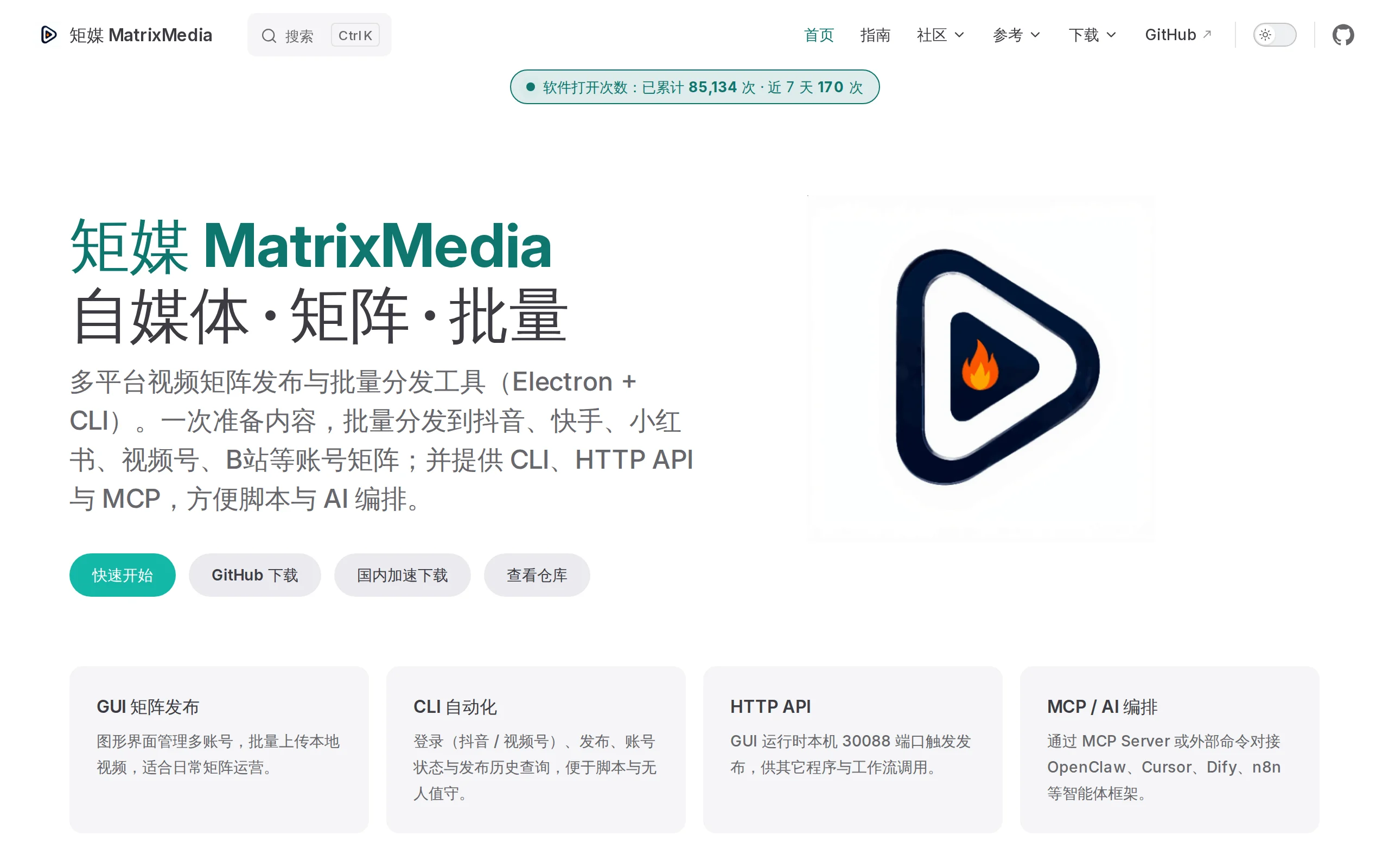
Executive Summary:
MatrixMedia is an open-source multi-platform video matrix publishing and bulk distribution tool. Its core value lies in helping self-media operators achieve an efficient workflow of "one-time preparat...
1. What is MatrixMedia
MatrixMedia is an open-source multi-platform video matrix publishing and bulk distribution tool. Its core value lies in helping self-media operators achieve an efficient workflow of "one-time preparation, full-network distribution." It supports bulk distribution of the same video content across eight major platforms, including Douyin, Kuaishou, Xiaohongshu, Video Account, Bilibili, Toutiao, Baijiahao, and Tomato Video. It also provides four access methods: graphical user interface (GUI), command-line interface (CLI), HTTP API, and MCP Server, catering to both manual operations and automated orchestration needs. MatrixMedia emphasizes seamless integration with AI agents—its CLI follows a common contract of external commands, exit codes, and JSON output, allowing any orchestration framework to call it directly. Additionally, the built-in MCP Server enables native invocation by AI tools such as Claude Desktop, Cursor, and Cline, achieving full automation from content generation to distribution. Furthermore, MatrixMedia offers operational support features such as data statistics, comment interaction, and scheduled publishing, providing a complete open-source solution for self-media matrix operations and unattended bulk publishing scenarios.
Technical positioning and domain: MatrixMedia belongs to the content distribution and automated operations domain, specifically focusing on multi-platform video synchronization publishing, account matrix management, and content operation automation. By introducing support for the MCP protocol and a universal CLI contract, it positions itself as content publishing infrastructure for the AI era, rather than just a simple upload tool.
Development background: MatrixMedia was initiated and open-sourced by developer hanliang97, with the project hosted on GitHub and accompanied by an official project homepage. Its development was motivated by the repetitive tasks in self-media matrix operations, such as repeated uploads, multi-platform adaptation, and account switching, as well as the limitations of existing similar tools, which are mostly closed-source and paid, and do not support script-based calls. The project includes an AI-powered end-to-end development mode, requiring changes to the main publishing chain to be validated on real platforms. This engineering practice is relatively rare among open-source tools.
Core value: MatrixMedia addresses the core pain points of "multi-platform, multi-account, bulk publishing" in self-media matrix operations, reducing what used to take hours of manual distribution to minutes. Its unified reuse mechanism across four interfaces (GUI login once, CLI/HTTP/MCP all reuse the same session) avoids the hassle of repeatedly scanning QR codes to log in. For AI content workflows, MatrixMedia provides the final-mile connection capability from content generation to publishing, enabling content production agents to autonomously complete distribution tasks.
Technical features: The technical highlight of MatrixMedia is its "four-in-one encapsulation of capability interfaces"—the same publishing core is exposed through four access forms: GUI, CLI, HTTP API, and MCP, all sharing the same login session at the bottom layer. This design is rare among similar tools. The CLI outputs structured JSON and adheres to standard exit code conventions, allowing MatrixMedia to seamlessly integrate with any external scheduler, CI/CD pipeline, or AI Agent framework, offering high programmability and integrability.
2. Key Features
GUI Matrix Publishing: Provides a graphical interface-based multi-account management panel, allowing users to batch upload local videos and select multiple platform accounts for distribution. The GUI mode is suitable for daily matrix operations, reducing the learning curve. Operators can complete multi-platform publishing tasks without writing any code, with account status and publishing history displayed visually.
CLI Automated Publishing: The command-line interface mode supports terminal QR code login for Douyin and Video Account, and can publish videos to eight platforms using the
matrixmedia cli publishcommand. It also supports querying account status and publishing history. The CLI exposes standard external command functionality in the format of "subcommand + exit code + JSON output," meaning that any programming language, Shell script, or task scheduler can invoke MatrixMedia capabilities at zero cost.HTTP API Service: When the GUI is running, it automatically listens for HTTP services on port 30088 of the local machine. External programs can trigger single-platform or multi-platform publishing via the
POST /publishinterface. The API'splatformsarray parameter allows for the submission of multiple platforms for sequential publishing, offering developers a flexible, programmatic integration point, ideal for integration into proprietary business systems.MCP Server Support: MatrixMedia includes a built-in Model Context Protocol (MCP) service, currently exposing nine callable tools to AI utilities such as Claude Desktop, Cursor, and Cline. These tools cover core operations like publishing, data querying, and comment management. This enables AI agents to directly understand and operate MatrixMedia, completing video publishing tasks within conversations.
AI Orchestration Integration: The CLI adheres to the common convention of external commands with exit codes and JSON output, allowing any orchestration framework such as OpenClaw, Dify, or n8n to directly integrate with MatrixMedia capabilities without requiring the development of dedicated plugins or adapters. This design naturally positions MatrixMedia as the "publishing actuator" in AI content production pipelines, enabling full automation of the "generate → publish" workflow.
Data Statistics and Monitoring: The system automatically collects and reads data snapshots such as follower counts, views, and likes for each account. It supports querying the publishing data of individual works by title. Operators can regularly synchronize data using the
cli statsandcli stats-synccommands, providing quantitative metrics for evaluating the effectiveness of matrix operations.Comment Interaction Management: MatrixMedia can retrieve comments from Douyin, Kuaishou, and Video Account, and supports replying to comments in dry-run validation mode. All interactive operations are by default not executed in real-time and require explicit confirmation before execution. Interaction records are kept throughout the process, effectively preventing risks associated with automated misoperations.
Scheduling and Multi-Platform Distribution Strategy: Supports one-time scheduled publishing and sequential multi-platform distribution, allowing the same video to be published in sequence to multiple platforms. Remote video URLs are downloaded only once, avoiding repeated fetching and reducing traffic consumption. This provides precise control over timing and rhythm in marketing campaigns and serialized content publishing scenarios.
3. Application Scenarios
Self-Media Matrix Operations: MCN organizations or self-media teams can distribute the same video across multiple platform accounts such as Douyin, Kuaishou, and Xiaohongshu, achieving "one-time creation, full-network coverage." Through MatrixMedia's GUI interface, operations personnel can complete the tedious task of uploading content to each platform individually in just a few minutes, significantly improving content distribution efficiency.
Multi-Account Unmanned Publishing: Using CLI scheduled tasks or script scheduling, MatrixMedia can automatically perform batch uploads on servers or office computers during the night, enabling an unmanned publishing process. Users can add the
matrixmedia cli publishcommand to cron jobs or CI/CD pipelines to automatically execute publishing actions at scheduled times.AI Content Workflow Integration: After content generation agents (such as video generation models or automated copywriting agents) produce videos, they can directly call MatrixMedia via MCP or HTTP API to complete automated distribution. This scenario achieves full automation of the "AI-generated content → automatic publishing" workflow, greatly reducing the cost of manual intervention.
Data Monitoring and Interactive Operations: Operations teams can regularly collect data snapshots such as follower counts and content metrics from each account through MatrixMedia. They can centrally manage comment sections of videos on Douyin, Kuaishou, and WeChat Video Accounts, and use a dry-run verification mechanism to reply to user comments in bulk. MatrixMedia's traceability ledger function ensures that all interactive actions are traceable, reducing operational risks.
Scheduled Publishing and Rhythm Control: For marketing events, serialized content, or time-limited promotions, operators can set up one-time scheduled publishing within MatrixMedia to synchronize content launch across multiple platforms at optimal time points. The design that downloads remote video URLs only once also reduces bandwidth and storage costs during multi-platform distribution.
4. How to Use
Download and Installation: Download the installation package for your operating system (supporting Windows, macOS, and other mainstream desktop systems) from GitHub Releases or domestic Gitee Releases, and complete the installation according to the prompts. For macOS, you need to additionally execute
sudo ln -sf /Applications/matrixmedia.app/Contents/MacOS/matrixmedia /usr/local/bin/matrixmediato create a command-line symbolic link; the Windows installer will automatically configure the PATH environment variable.Add Account and Log In: Add accounts for each content platform in the GUI account management section, and complete the scan code or web login according to the platform's requirements. Command-line scan code login is currently only supported for Douyin and Video Account; after a successful GUI login, session information will be uniformly stored, and CLI, HTTP API, and MCP tools can automatically reuse the same login session.
Prepare Content for Publication: Prepare the video file to be published (supporting local paths or http(s) remote URLs), and determine metadata such as title, description, and tags. Remote video URLs will be downloaded only once during matrix distribution, avoiding repeated pulls.
Execute Video Publication: Enter the "Local Video Publication" interface in the GUI for batch uploads, or execute the command
matrixmedia cli publish -p dy --phone 13800138000 -f video path -t "title" --tags "#tag"in the command line. You can also call thePOST /publishinterface of the HTTP API or trigger it through the MCP tool.Multi-Platform Matrix Distribution: When distributing to multiple platforms, use the
platformsarray parameter of the HTTP API or select the target platforms in bulk in the GUI. A single submission will distribute content to each platform in sequence. Matrix Media will execute them in the order of the platforms to avoid rate limiting on the platform side caused by concurrent operations.View Publication Results and Post-Publication Operations: View the publication status on each platform using the
matrixmedia cli historycommand or the publication history interface in the GUI. Scheduled publication tasks can be left to be executed automatically by the system. For post-publication operations, usecli statsandcli stats-syncto collect account data,cli commentsto retrieve comments, andcli comments-replyto reply and interact.
Notes: The comment reply feature of Matrix Media defaults to running in dry-run mode, which will not actually send replies. It requires explicit confirmation before execution. For sensitive platforms such as Xiaohongshu, it is recommended to use the real browser publication mode to avoid automated detection of the Electron built-in window. For first-time use, it is advisable to complete a full publication process once in the GUI, confirming that all platform account statuses are normal before proceeding with script-based calls.
5. Pros and Cons Analysis
| Pros |
|---|
| Unified interface reuse across four types: GUI, CLI, HTTP API, and MCP share the same login session partition. Once logged in via GUI, all other interfaces automatically reuse the session, avoiding repeated scanning and significantly reducing account management costs in multi-interface scenarios. |
| Zero-cost AI orchestration integration: CLI follows a common contract of external commands, exit codes, and JSON output, allowing any orchestration framework or custom scheduler to directly invoke it. The MCP Server enables native operation of AI tools like Claude and Cursor on JuMei capabilities. |
| Real platform e2e verification mechanism: The project includes an AI-powered e2e development mode. Any changes to the main release path must be verified on real platforms, offering higher reliability than similar tools that only simulate DOM. This reduces the risk of functional failure due to platform interface changes. |
| Controllable traceability of comment interactions: Comment replies default to dry-run mode and must be explicitly confirmed before being sent. Interaction records are fully tracked throughout the process, effectively preventing account risks caused by automated misoperations. |
| Avoidance of detection on sensitive platforms: On sensitive platforms like Xiaohongshu, a real browser publishing mode can be used, bypassing automated detection of Electron's built-in windows at the lower level, thereby improving the success rate of publishing on sensitive platforms. |
6. Comparative Analysis with Similar Tools
| Comparison Dimension | MatrixMedia | AntXiaoer | Yimeizhu |
|---|---|---|---|
| Core Positioning | Open-source, matrix publishing infrastructure oriented towards AI orchestration | Commercial multi-platform content distribution tool | Commercial self-media management tool |
| Access Method | Unified reuse of four interfaces: GUI, CLI, HTTP API, and MCP Server | Primarily GUI, with browser plugin support | Primarily GUI, with partial API support for some features |
| Platform Coverage | Supports 8 platforms including Douyin, Kuaishou, Xiaohongshu, Video Account, Bilibili, Toutiao, Baijiahao, and Tomato Video | Supports content distribution on 30+ platforms | Supports publishing management on 20+ self-media platforms |
| Automation Capability | CLI standard external command contract, compatible with any orchestration framework; built-in MCP support | Supports scheduled publishing and batch operations, but limited scripting capabilities | Provides scheduled publishing and multi-account management; API requires enterprise version |
| AI Integration Depth | MCP Server allows direct calling of Claude, Cursor, etc., AI Agent-friendly | No native AI integration capability | No native AI integration capability |
| Open Source License | Open-source and free, code hosted on GitHub | Closed-source commercial software, charged by package | Closed-source commercial software, charged by feature |
| Interactive Operations | Supports comment retrieval from Douyin, Kuaishou, and Video Account, with dry-run reply tracing | Provides comment management functionality | Provides comment management functionality |
| Community Ecosystem | Driven by open-source community, supports secondary development and contributions by developers | Maintained by commercial teams, with stable updates | Maintained by commercial teams |
Selection Recommendations:
For teams with strong technical capabilities and a desire to integrate content publishing into an automated pipeline, MatrixMedia is a suitable choice within the current open-source ecosystem. Its CLI standard external command contract and MCP Server support enable seamless integration with open-source or commercial orchestration frameworks such as Dify, n8n, and OpenClaw, forming a closed loop of "AI generation → automatic distribution." For individual creators or operations teams that prioritize platform coverage breadth and do not require programming integration, mature commercial tools like AntXiaoer and Yimeizhu may be more straightforward — they offer broader platform support, more robust after-sales support, and more complete documentation. However, they have limited scripting capabilities and AI integration depth, and cannot be used in the free and open-source manner that MatrixMedia offers. For large MCN organizations, Rongmei Bao provides more comprehensive mobile app support and team collaboration features, but its API openness must be evaluated to determine whether it meets the integration requirements of their own systems.
7. Editor's Summary
MatrixMedia has carved out a differentiated path within open-source video distribution tools. It encapsulates the traditional requirement of "multi-platform publishing" into four interface forms and has implemented a well-engineered design for unified reuse of login states — once a user scans a code to log in via the GUI, the CLI, HTTP API, and MCP tools all share the same session. This mechanism significantly reduces the management costs of multi-platform accounts in practice.
Technically, MatrixMedia's most valuable innovation lies in the standard external command contract of the CLI and the native support of the MCP Server. The former means that MatrixMedia can be called by any scheduling system without relying on any specific orchestration framework. The latter provides a standard protocol channel for AI agents to directly operate the publishing workflow. This "tool-agnostic" integration design gives MatrixMedia the potential to become a "publishing actuator" within AI content workflows.
The built-in AI automatic end-to-end development mode in MatrixMedia is also worth noting — changes to the main publishing code path must be verified on real platforms before being merged. This engineering practice is quite rare among open-source tools and directly enhances the tool's reliability in real-world environments. The default dry-run mode for comment interactions, along with full traceability throughout the process, reflects the development team's pragmatic consideration of the risks associated with automated misoperations.
Currently, MatrixMedia's target audience is relatively focused: self-media matrix operators with some technical capabilities, technical leads at MCN organizations, and developers and product teams building AI content automation pipelines. For individual creators who operate manually and have no programming needs, the GUI interface is usable, but commercial tools still hold advantages in platform coverage and customer support. MatrixMedia's community ecosystem is still in its early stages, and the accumulation of documentation and troubleshooting resources will take time.
In terms of growth potential, MatrixMedia's open-source nature and AI orchestration positioning give it the opportunity to gain more attention as the MCP protocol and AI Agent ecosystem mature. At present, content platforms are continuously tightening their API strategies, and MatrixMedia's long-term maintenance depends on the sustainability of community contributions, which is an uncertain factor in its development process. Overall, MatrixMedia is a noteworthy open-source infrastructure project for self-media distribution within the open-source community, providing a programmable, integrable, and reliable implementation path for automated content publishing.
8. FAQ
Q: Which content platforms does MatrixMedia support?
A: MatrixMedia currently supports video publishing on eight platforms: Douyin, Kuaishou, Xiaohongshu, Video Account, Bilibili, Toutiao, Baijiahao, and Tomato Video. The CLI QR code login is only supported on Douyin and Video Account, while other platforms require account addition and login via GUI. Comment retrieval and interaction are currently available on Douyin, Kuaishou, and Video Account.
Q: How can MatrixMedia's HTTP API be used in unattended scenarios?
A: MatrixMedia's HTTP API listens on port 30088 on the local machine during GUI runtime. Users must first start the GUI on the target machine and complete account login. After that, external programs can trigger publishing tasks via the POST /publish interface. The platforms array parameter allows multiple platform sequential publishing in a single submission. The API service stops when the GUI exits. For long-term unattended operation, the GUI process must remain active, and auto-start on boot should be considered.
Q: Can MatrixMedia be integrated with existing AI workflows?
A: Yes. MatrixMedia provides two integration paths: one is through the built-in MCP Server, allowing tools such as Claude Desktop, Cursor, and Cline that support the Model Context Protocol to directly call nine MatrixMedia tools; the other is the CLI, which follows the general convention of "external command + exit code + JSON output." Tools such as OpenClaw, Dify, n8n, or any custom scheduler can directly invoke MatrixMedia commands as child processes without requiring a dedicated adapter.
Q: How does the dry-run mode for comment replies work?
A: By default, MatrixMedia's comment retrieval and reply functions operate in dry-run (simulated) mode. The system displays the content and results of the reply but does not actually send it. Users must explicitly confirm the reply to be sent after verifying it is correct. MatrixMedia records all interactive logs throughout the process, and operations staff can trace the details and status of every interaction at any time.
Q: How is the login status shared between GUI and CLI?
A: MatrixMedia's GUI and CLI share the same session partition. Once a user completes account QR code login in the GUI, the CLI, HTTP API, and MCP tools automatically reuse this login status, eliminating the need to scan the code again for each interface. This design significantly reduces account authentication operations in scenarios where multiple interfaces are used together. CLI QR code login is currently only supported on Douyin and Video Account.
Q: Is there a risk of account suspension when using MatrixMedia?
A: MatrixMedia includes some built-in risk control mechanisms: comment replies default to dry-run mode to prevent accidental operations; sensitive platforms such as Xiaohongshu offer a real-browser publishing mode to avoid automated detection of the Electron built-in window; multi-platform distribution uses sequential execution rather than concurrent operations. However, any third-party publishing tool deviates from the official publishing interfaces of each platform. Users must still assess their own risk tolerance based on the platform's rules.
9. Project Links
- Project Website: https://hanliang97.github.io/MatrixMedia/
- GitHub Repository: https://github.com/hanliang97/MatrixMedia
Related
cinecode: Open-Source AI Film Production Toolkit, Drive the Entire Film Production Pipeline with a Single Sentence
cinecode is an open-source AI film production toolkit developed by Turkish developer sarpstar, deeply integrated into AI coding environments such as Claude Code and Cursor. Users only need to provide ...

Reveric (Huanjie) Review: An Integrated AI Creation Workbench from Novel to Final Video
Reveric (Huanjie) is an open-source AI content creation desktop workbench that employs an Agent Native architecture, deeply integrating agents into the creative process to achieve a complete closed-lo...
WeMM-Video – Tencent's Open-Source Multimodal Large Model Series for Chinese and English
WeMM-Video is an open-source Chinese-English bilingual multimodal large model series developed by Tencent's WeChat Vision Team. It includes four specifications: 2B, 4B, 9B dense models, and a 35B-A3B ...

Shotkit: Open-Source AI Pre-Production Tool, a Creation Pipeline Centered on Brand Consistency
Shotkit is an open-source AI pre-production tool developed by the WhyStrohm team, running as a Claude Code plugin and offering a Mac desktop application called Canvas. This tool builds a complete bran...
© All Rights Reserved. Some content on this site is partially generated by AI with human review.