
Shotkit: Open-Source AI Pre-Production Tool, a Creation Pipeline Centered on Brand Consistency
Executive Summary:
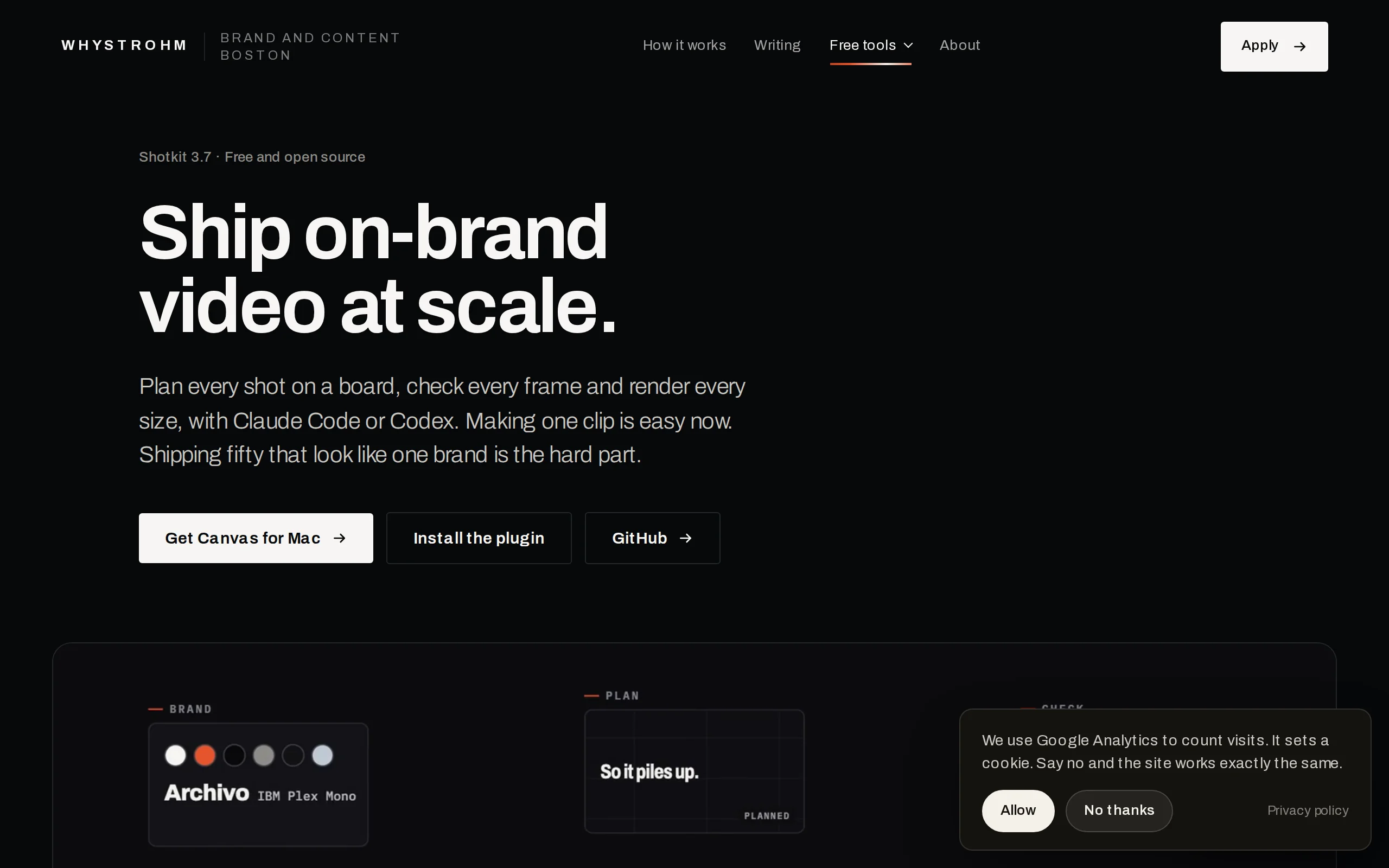
Shotkit is an open-source AI pre-production tool developed by the WhyStrohm team, running as a Claude Code plugin and offering a Mac desktop application called Canvas. This tool builds a complete bran...
1. What is Shotkit
Shotkit is an open-source AI pre-production tool developed by the WhyStrohm team, running as a Claude Code plugin and offering a Mac desktop application called Canvas. This tool builds a complete brand video production pipeline: first, brand guidelines such as brand colors, fonts, tone, and restrictions are extracted into a brand lock file. Then, storyboard planning is conducted through the canvas, with cost estimates generated for previews before production. Each AI-generated frame undergoes per-frame quality review by the Critic module, and finally, Remotion automatically outputs multi-size finished videos. Its core value lies in solving the consistency challenges when generating large volumes of videos for the same brand. All data is stored locally, and users connect directly to the service using their own API keys, without needing to go through any third-party platforms.
Technical Positioning and Domain: Shotkit resides at the intersection of AI video pre-production and brand asset management, positioned between AI video generation tools and project management platforms. It is centered on workflow orchestration, linking content planning, cost estimation, quality control, and multi-format rendering. In the AI video production chain, it occupies a key position in pre-production and quality inspection.
Development Background: This tool was created by the WhyStrohm team, which has deep expertise in creative technology and brand content production. The team observed that while AI video tools have significantly lowered the barrier to entry for video generation, they still face practical issues when producing large volumes, such as brand style drift, uncontrollable costs, and complex multi-platform adaptation. Therefore, they designed a consistency control mechanism centered on the "brand lock" and released it as open-source.
Core Value: Shotkit decouples brand guidelines from prompts, solidifying them into independent brand lock files, which provide objective verification standards for every generated frame. It also introduces a human approval node to ensure creative control remains in the hands of people, with AI only responsible for execution. Its transparent cost mechanism allows for pre-approval of every AI-related expense, avoiding unnecessary spending. The ability to render multiple sizes in one production significantly reduces distribution costs across various platforms.
Technical Features: The system employs a modular pipeline design, achieving closed-loop quality management through the Critic cycle. Unqualified frames are automatically re-generated rather than requiring a full re-render, effectively controlling costs. As a Claude Code plugin, it deeply integrates AI capabilities, with local execution as the default mode, ensuring data autonomy.
2. Key Features
Brand Lock: After pasting the company's website URL, the system automatically extracts color schemes, fonts, tone, and prohibited items, generating a brand compliance document that all shots must follow. This document exists independently of the prompt and serves as an objective benchmark, ensuring consistency in both the visual and textual style of batch-generated videos.
Shot Planning: After the user describes their requirements in one sentence, the system automatically expands the shot-by-shot plan on the canvas. Users can drag cards, modify text, and adjust transition methods. No AI calls are made during the planning phase, so no costs are incurred, allowing users to complete creative ideation and refine their concepts without spending money.
Price Preview: Before actually invoking AI generation, the system calculates the total cost based on the public pricing of fal.ai. The user must confirm the cost before generation proceeds. This mechanism places cost control upfront, preventing unexpected expenses from blind generation and demonstrating the tool's respect for the user's budget.
Frame-by-Frame Review: Each AI-generated frame must go through a review process by the Critic, resulting in a three-tier judgment based on the Brand Lock: "Approved," "Rejected for Edits," or "Discarded." Only frames that fail the review trigger regeneration, while approved frames move directly to the next step, enabling fine-grained quality control.
Multi-Resolution Rendering: The same set of shots is automatically cropped and output in four different aspect ratios: 16:9, 9:16, 4:5, and 1:1. This allows a single production to be compatible with platforms such as YouTube, Reels, Feed, and Squares. The system automatically adjusts the composition, eliminating the need for repetitive editing across different platforms.
Plan Sharing and Handover: The system supports generating printable client-facing pages in PDF format, PPT storyboard drafts, static frame images, rough-cut MP4s, as well as EDL, subtitle files, and shot lists for handover to editors. This comprehensive output system enables the plan to be used for client communication and seamlessly integrated into professional post-production workflows.
3. Application Scenarios
SaaS companies mass-producing social media videos: Marketing teams can plan and render dozens of Reels or Shorts content pieces in one go, all maintaining consistent color schemes, fonts, and tone. Brand locking ensures that all videos adhere to a unified visual standard, addressing the issue of style drift across multiple batches of content.
Advertising agencies proposing concepts to clients: Before formal production, teams can quickly generate storyboard pages, PDF client documents, and PPT proposals at a very low cost to align creative direction. Once the client confirms, the AI generation phase can proceed, avoiding waste from rework due to directional changes.
Founders and self-media IP building content ecosystems: Individual creators can convert product launches, industry insights, and other briefs into multi-platform short videos with a unified visual style. The local runtime mode allows sensitive content to remain on-premise without uploading to third-party platforms, ensuring content security.
Product launch video production: By inputting a single sentence describing the launch requirement, the system automatically generates a shot-by-shot plan and outputs rough-cut videos in four different platform dimensions. Full automation from creative concept to multi-format output reduces the preparation cycle for launches from weeks to just a few hours.
Brand marketing teams conducting initial reviews of assets: Teams can use Critic to inspect frame-by-frame whether outsourced or AI-generated assets meet brand standards. Non-compliant frames are automatically sent back for rework. This scenario extends Shotkit from a production tool into a quality control platform, reducing the cost of manual reviews.
4. How to Use
Environment Requirements: Shotkit runs as a Claude Code plugin and requires the Claude Code environment to be installed first. The Mac version of the Canvas app supports macOS systems, with all files stored locally and no need for additional server configuration. Users must provide their own API keys for services such as fal.ai. Data is transmitted directly without passing through third-party intermediaries.
Installation Steps: Run
/plugin install shotkit --marketplace whystrohm/shotkitwithin Claude Code to complete the plugin installation. Mac users can also download the Canvas app from GitHub Releases, extract it, and then run./start.shto launch the local interface.Adding a Brand: Paste the company's website URL into the app, and Shotkit will automatically extract colors, fonts, tone, and prohibited items. After the system generates an initial brand guideline, users must manually review and confirm it, which will be finalized as a
brand-lock.mdfile. This file becomes the verification standard for all generated shots.Input and Adjust the Brief: Describe your video requirements in one sentence, such as "30-second product launch video, 9:16," and the system will automatically lay out a shot-by-shot plan on the canvas. Users can drag shot cards, modify the copy, and adjust transitions, or ask Claude to generate an alternative version. No AI calls are made during this phase, so no costs are incurred.
Approve Cost and Generate: Review the estimated cost calculated based on fal.ai's pricing model. Once confirmed, AI generation is triggered. After each frame is generated, Critic checks it against the brand lock. Frames that pass move to the next stage, while rejected or discarded frames are automatically regenerated.
Manual Fine-tuning and Export: Make final adjustments to any unsatisfactory shots or copy on the canvas. Then, render the video in four different aspect ratios with one click: 16:9, 9:16, 4:5, and 1:1. You can also export PPT, PDF client-facing documents, rough-cut MP4 files, and files for handover to editors, completing the full workflow from planning to delivery.
5. Pros and Cons Analysis
| Pros |
|---|
| Brand Consistency is Achievable: Brand guidelines are solidified into independent files rather than just existing within prompts. Each shot is evaluated based on a unified standard, fundamentally addressing the industry pain point of style deviation during batch generation. |
| Transparent and Controllable Cost: Total cost is calculated based on the public pricing of fal.ai before generation. Approval is required before execution, and only不合格 frames are rerendered, avoiding repeated payments for low-quality outputs. Actual testing shows a single run costs approximately $2.34, offering strong controllability. |
| Human-AI Collaboration Architecture is Reasonable: Each step—planning, pricing, and final output—includes a manual approval node. AI only handles execution tasks, while creative decision-making remains in the user's hands, aligning with the habits of professional creative workflows. |
| Comprehensive AI Review Mechanism: Critic evaluates each frame for approval, rejection, or discard. Only不合格 frames are automatically rerendered rather than restarting the entire process, ensuring quality while controlling costs, and forming a closed-loop management system for production quality. |
| Efficient Multi-Size Output: A single shot group is automatically cropped into four mainstream aspect ratios, enabling one production run to adapt to multiple platforms, significantly reducing content production costs for multi-platform distribution and improving output efficiency. |
| Open Source and Free, with Data Autonomy: Fully open-sourced under the Apache 2.0 license. All files are stored locally, with built-in keys connecting directly to services. Materials and final outputs do not go through third-party platforms, ensuring data security. |
6. Comparative Analysis with Similar Tools
| Comparison Dimension | Shotkit | LTX Studio | Runway |
|---|---|---|---|
| Product Form | Open-source project: Claude Code plugin + Mac local Canvas application | Commercial SaaS: Browser-based cloud platform, available only on desktop browsers | Commercial SaaS: Cloud platform, supports web and mobile |
| Open-source Status | Fully open-source and free under Apache 2.0 | Closed-source, only the weights of the underlying LTX-2 model are open-sourced | Closed-source, core technologies and models are not open |
| Core Selling Points | Brand Consistency Pipeline: Brand Lock → Storyboarding → Frame-by-frame Review → Multi-size Output | One-stop narrative workflow: Scripting, AI Storyboarding, Role/Scene Consistency Elements, Timeline | General-purpose AI video generation, offering text/image/video generation and editing capabilities |
| Consistency Solution | Extracts brand lock (color, font, tone, restrictions) from URLs and checks frame-by-frame against it | Extracts reusable Elements (characters, objects, scenes) from scripts and maintains consistency across shots | Maintains consistency through style references and seed settings, with results dependent on manual tuning |
| AI Review Mechanism | Yes: Critic evaluates each frame for approval, rejection, or discard, automatically re-generates if不合格 | No independent review stage; relies on manual timeline adjustments | No review stage; users manually filter generated results |
| Cost Model | Free, only self-paid fal.ai generation costs (tested at ~$2.34 per use), quotes provided before execution | Subscription-based: Standard starts at $35/month, Pro at $125/month for advanced models | Subscription/credit-based: billed by generation duration or count, with prices increasing across tiers |
| Data and Privacy | All files stored locally, with built-in key direct connection to services | Runs in the cloud, requires uploading materials to the platform | Processes in the cloud, uploads materials to the platform, with data retention policies in place |
| Team Collaboration | Weak, primarily for individuals or small teams | Supports multi-person collaboration within projects (Pro version allows 3 collaborators) | Provides team workspace functionality, billed per seat |
Selection Recommendations: For brand marketing teams, self-media matrix operators, and individual creators prioritizing data privacy, Shotkit's brand lock consistency mechanism and local execution model offer clear advantages, especially in scenarios requiring bulk brand video production with cost sensitivity. Its fully open-source and free nature lowers the barrier to entry, making it worthwhile to first evaluate the actual results through a full workflow.
If the team requires a one-stop narrative development solution and multi-person collaboration, and is willing to upload materials to the cloud, LTX Studio's Elements-based role consistency system and Pro version collaboration features are more suitable. If the creative needs are flexible and not strictly bound by brand guidelines, Runway and Pika provide broader coverage for diverse video creation scenarios, but users must accept higher per-generation costs.
7. Editor's Summary
In the industry trend where AI video tools are generally pursuing "fully automated generation," Shotkit has chosen a product path centered on "controllability," a direction that offers clear differentiation. The brand lock mechanism transforms style consistency from vague prompt engineering into a verifiable objective standard, enabling a structured expression of brand asset management in technology and directly addressing the most challenging issue in bulk video production: style drift. The Critic frame-by-frame review mechanism establishes a closed-loop for generation quality, shifting AI from an unconstrained content producer to a verifiable execution unit. This design, which separates review from rework, significantly improves cost efficiency.
From a practical value perspective, Shotkit's cost pre-approval mechanism and one-click multi-size output functionality precisely address creators' real needs for budget control and distribution efficiency. Real-world testing shows a cost of approximately $2.34 per run, and combined with its open-source and free licensing model, it allows small and medium teams as well as individual creators to build a brand video production pipeline with minimal barriers.
This tool is more suitable for marketing teams with clear brand guidelines, director-type creators who value creative decision-making authority, and sensitive industry users requiring localized data processing. While its team collaboration capabilities and platform coverage still have room for expansion, as an open-source project, its core pipeline design already demonstrates strong scalability. As the community ecosystem grows, Shotkit has the potential to form a more complete solution system in the niche area of AI video pre-production.
8. FAQ
Q: What is the difference between Shotkit and using AI video generation tools directly?
A: Shotkit is positioned as a pre-production and quality control pipeline, not the generation engine itself. It manages the planning phase before AI generation, quality review during generation, and format adaptation after generation. Users still need to invoke generation services like fal.ai using their own API keys, but all operations are completed within Shotkit's controlled workflow, ensuring brand consistency and cost control.
Q: Can the brand lock file be manually edited and updated?
A: Yes. The brand lock file (brand-lock.md) can be manually corrected and locked after generation. This file serves as the validation benchmark for Critic's review process and can be updated as brand guidelines change. After modification, all subsequent generated frames will be reviewed based on the new standards.
Q: What should I do if I'm not satisfied with an AI-generated shot?
A: Critic provides three judgments: "Approved," "Revise," or "Discard." Frames marked for revision will be automatically regenerated based on the suggested changes, while discarded frames are directly removed. Users can also manually flag unsatisfactory shots on the canvas and trigger re-generation. Only the不合格 frames are re-generated, avoiding the extra cost of full re-generation.
Q: How is the actual cost of a single video production calculated?
A: The cost depends on the number of shots, the complexity of each shot, and fal.ai's real-time pricing. Shotkit provides an estimated cost based on public pricing before generation, and the user must approve it before execution. In testing, a single run costs approximately $2.34, and actual costs vary depending on the project's scale, but all charges are confirmed before execution.
Q: Does Shotkit support Windows or Linux systems?
A: The current Canvas application for Shotkit is only available for macOS. Windows and Linux users can access all core features, including brand lock, storyboard planning, frame-by-frame review, and multi-resolution rendering, via the Claude Code plugin. However, they will miss out on the graphical interface experience provided by Canvas.
Q: What is the level of commercialization of the project, and are there related services available?
A: Shotkit is fully open-source and free under the Apache 2.0 license, and currently does not offer commercial services. Users are responsible for maintaining their own environment and managing API keys. For enterprise users requiring technical support or customized development, they can participate in community discussions via the GitHub repository or contact the maintenance team.
9. Project Links
- Project Website: https://whystrohm.com/shotkit
- GitHub Repository: https://github.com/whystrohm/shotkit
Related
GLM-5.4 —— Zhipu AI Launches Its First Flagship Model Using Loop Transformer Architecture, Unlocking 2–3T-Level Intelligence with Shared-Weight Cycles
GLM-5.4 is Zhipu AI's first-generation flagship large language model that adopts the Loop Transformer architecture. By enabling a set of layers with shared weights to perform multiple rounds of infere...
Hy4 flash – Tencent HunYuan's High-Cost-Performance Large Model
Hy4 flash is a high-cost-performance large model launched by Tencent HunYuan, which employs a sparse mixture-of-experts (MoE) architecture with a total of 224B parameters and 12B active parameters. It...
OpenMotion – Open-Source AI Video Recreation Tool, Replicate Videos Using Brand Assets
OpenMotion is an open-source intelligent video production tool. Its core capability lies in deeply analyzing reference videos through AI, extracting the sequence of shots, transition logic, and narrat...
WuJie·PhysCapBench – The First Unified Benchmark for Evaluating Cross-Domain Video Physical Description Capabilities Launched by Zhixin
WuJie·PhysCapBench is the first cross-domain video physical description evaluation benchmark introduced by Inverse Matrix in collaboration with the Zhixin Institute of Research and Peking University. ...
© All Rights Reserved. Some content on this site is partially generated by AI with human review.