
nanoMuse – An Open-Source Personal Agent from Zhejiang University, the Open-Source Version of Muse
Executive Summary:
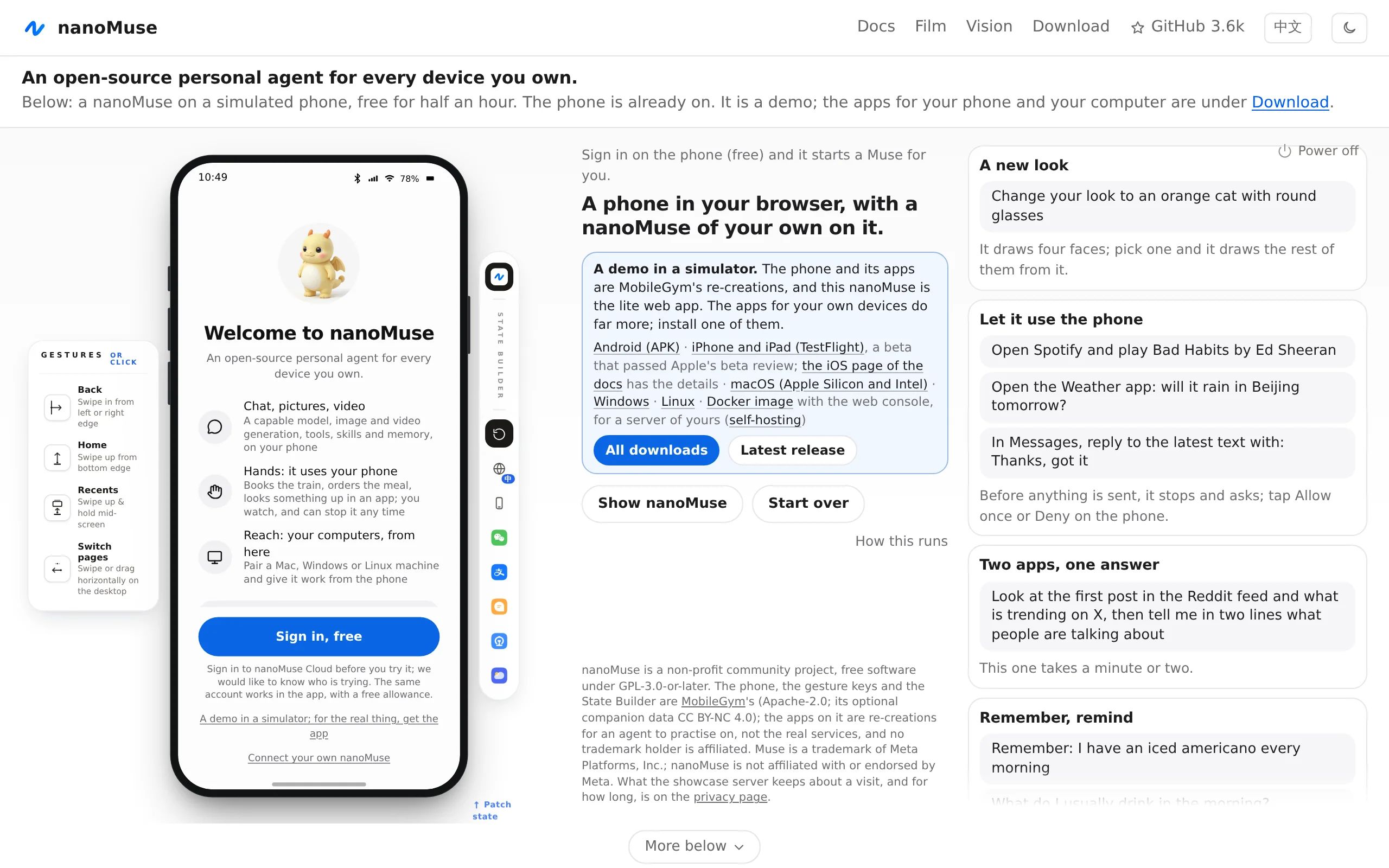
nanoMuse is an open-source personal agent project developed by the Zhejiang University team. Its core concept is to allow users to run a complete AI Agent on their own devices, achieving a cross-devic...
1. What is nanoMuse
nanoMuse is an open-source personal agent project developed by the Zhejiang University team. Its core concept is to allow users to run a complete AI Agent on their own devices, achieving a cross-device collaborative closed-loop where "the phone reads information, the computer does the work, and other devices view the results." Unlike traditional cloud-based agents, nanoMuse runs the agent locally on the user's device, supporting users to delegate tasks to their computer by sending "@Mac + task" instructions from their phone, and automatically routing approval requests back to the mobile device. The project uses the GPL-3.0-or-later open-source license and covers six types of platform clients and relay services, serving as an open-source alternative to the commercial product Meta Muse.
Technical positioning and domain: nanoMuse belongs to the field of on-device agents (On-Device Agent) and cross-device collaborative computing. By deploying AI agents on personal devices, it enables autonomous task execution and multi-device coordination, breaking through the limitations of traditional cloud-based agents in terms of privacy protection and local application accessibility.
Development background: This project was developed by the Zhejiang University team and released in 2026. It is currently in a rapid iteration phase, with dozens of version updates completed within about five weeks of its release, and the GitHub star count has already exceeded 2.5k. The development motivation focuses on addressing industry pain points such as cloud-based agents' inability to access native mobile applications and the difficulty of privately storing user data.
Core value: nanoMuse solves issues such as cloud-based agents' inability to operate local applications and the difficulty in ensuring user data privacy. Its secure approval mechanism restricts irreversible operations to a controlled scope, while also supporting fully self-hosted deployment, representing a technological trend in the evolution of agents from pure cloud services toward device sovereignty.
Technical features: The project employs a "screenshot + Hands" approach to achieve screen-level operations, allowing control of native applications without relying on APIs. Additionally, it has established mechanisms for local approval, manual password input, and auditability within its security architecture, offering a certain degree of differentiated technical advantages.
2. Key Features
Cross-device Collaboration: Each device runs an independent agent instance, with task distribution and state synchronization achieved through a unified relay service. Users can send "@device name + task instruction" from their mobile devices, and the computer automatically receives and executes the task. The execution results and approval requests are automatically sent back to the mobile device, forming a complete closed-loop interactive chain. This mechanism addresses the issue of traditional cloud-based agents being unable to access multi-device ecosystems.
Screen-level Operations (Hands): Based on visual recognition and coordinate positioning technology, the system can simulate human operational behavior, performing interactions such as taps and inputs on Android native apps and Windows/macOS/Linux desktop windows. In sensitive steps such as login or entering a verification code, the system will return control to the user for manual completion, effectively avoiding the risk of credential leakage.
Security Approval Mechanism: For irreversible operations such as deletion and payment, the system implements a mandatory stop-and-confirm mechanism. Users can choose from three approval granularities: "Once," "This Session," or "Always." All password and verification code information is designed to bypass the agent, ensuring that sensitive credentials are not exposed in the automated workflow.
Persistent Task Execution: Supports the setup of scheduled targets and routine tasks. Even when the app is in the background or closed, tasks can continue to run on the device. The system can automatically collect and summarize information at scheduled times and generate personalized feeds for users to review the next day.
Fully Open Source and Self-hosted: Both the client and relay service code are fully open-sourced under the GPL-3.0-or-later license. Users can deploy the relay on their own servers to achieve complete autonomy and control over the data flow. The platform also supports integration with major IM platforms such as Feishu, DingTalk, Enterprise WeChat, and Telegram, expanding the interaction entry points.
Multi-model Compatibility: The platform includes API integration support for 25 model providers. Users can directly use the free quota provided by the community relay, or configure custom OpenAI-compatible interfaces (e.g., ModelScope API-Inference). It also supports logging in directly using existing subscription plans for ChatGPT, Claude, Kimi, and others.
3. Application Scenarios
Mobile-to-desktop task handoff: While commuting, users can read order numbers from their order management App on their phone and send the "@Mac" command to transfer the task to their office computer. The system automatically opens Excel to fill in and saves it to the working directory. Once the user arrives at their workstation, they can directly access the results, reducing the need for manual data transfer.
Scheduled information aggregation and morning brief generation: Users can set up a task before bedtime, such as "Aggregate industry news at 7 AM every day." The computer will automatically perform information retrieval and feed generation during the night. In the morning, users can read the compiled information directly on their phone, and the task will continue to execute as planned even when the App is closed, achieving automated and personalized information retrieval.
Long-running tasks and mobile approvals: Users can schedule their computer to perform time-consuming tasks such as organizing the photo album or cleaning the download folder. When confirmation is needed for a deletion operation, the approval request is automatically pushed to the user's phone. The user can quickly approve or reject the request while on the subway, without needing to wait by the computer.
IM group chat-driven task generation and execution: By mentioning "@nanoMuse" in a Feishu or Telegram group chat, users can convert the reimbursement requirements discussed in the chat into local tasks. The system automatically opens the financial system to fill out the form. When the task reaches the payment stage, the system pauses and waits for the user to input a password for confirmation, enabling a secure transition from conversation to action.
4. How to Use
Install the Client: Access https://nanomuse.cn/ on your computer to download the installation package for your operating system (supports macOS, Windows, Linux). For mobile devices, install the Android APK or install the iOS version via TestFlight. Ensure your device meets the minimum system version requirements. It is recommended to keep your operating system updated to the latest version for full compatibility.
Log in with the Same Account: Register and log in using the same email or phone number on both your computer and mobile device. Ensure both devices are connected to the same relay service address. If you choose to self-host the relay, enter the custom relay server address and port number in the settings on both ends.
Configure Model Services: Users can directly use the free model quotas provided by the community relay, or add a custom OpenAI-compatible API interface in the settings. When configuring, you need to enter the interface's Base URL, API Key, and model ID. When connecting to services like ModelScope API-Inference, you must enter the access address provided by ModelScope accordingly.
Confirm Device Online Status: Open the Devices page and confirm that both your computer and mobile device appear in the device list with their status displayed as "Online." If a device shows as offline, check the network connectivity, relay service configuration, and whether the client is running in the background on the device.
Initiate Cross-Device Tasks: In the mobile device's conversation input box, send commands in the format "@device name + task instruction," for example, "@Mac calculate annual savings and write to savings.txt." The system will parse the device identifier and package the task for delivery to the target device for execution.
View Execution Results and Approvals: Tasks will be automatically executed in the computer session, and the result text will be synchronized back to the mobile device. When encountering irreversible operations such as deletion or payment, the system will push an approval request to the mobile device, allowing the user to click "Approve" or "Stop" to control the action. Please note that only text information is synchronized in the session; generated files must be retrieved through other means. The computer must remain powered on and the nanoMuse client must stay online during execution.
5. Pros and Cons Analysis
| Pros |
|---|
| Device Sovereignty and Data Privacy: The Agent runs entirely on the user's own device, and conversation text can remain completely within the local network (in self-hosted relay mode). Data does not need to pass through the vendor's cloud servers, offering strong privacy protection. |
| Cross-Device Collaboration: The integration of mobile commands, desktop execution, and mobile approvals forms a complete cross-device task loop, making it the only open-source alternative to Muse that fully supports cross-device operations, offering strong scenario coverage. |
| Operable Without API: The Agent can operate native apps and desktop windows using a "screenshot + Hands" method, breaking through the technical limitations of cloud-based Agents that cannot access local applications, and offering a broad range of applicability. |
| Secure and Controllable Architecture: Irreversible operations require mandatory approvals, and password verification codes must be manually entered. Combined with the Sentinel local approval mechanism, this restricts the Agent's autonomy within a revocable scope. |
6. Comparative Analysis with Similar Tools
| Comparison Dimension | nanoMuse (ZJU, Open Source) | Meta Muse (Closed Source, Commercial) | Open Interpreter (Open Source) |
|---|---|---|---|
| Core Architecture | Multi-device on-device Agent + optional self-hosted relay, each device runs an independent instance | One cloud-based Muse Secure VM per user, client connects uniformly | Runs locally, executes code operations by calling models such as GPT-4 |
| Mobile Screen Operation | Android screen-level Hands operations, supports native App interaction | No, VM cannot access native mobile applications | Does not support mobile native app operations |
| Computer Screen Operation | Natively supports Windows/macOS/Linux platforms | Observes operations via a "darkened real-time stage" through macOS app | Primarily code execution, limited screen operation capabilities |
| Cross-device Collaboration | Devices assign tasks to each other, automatically route back to the phone for approval, forming a closed loop | All clients connect to the same cloud VM, no task transfer between devices | Single-machine operation, no native cross-device support |
| Model Integration | 25 providers with built-in keys and free quotas, supports login with ChatGPT/Claude/Kimi packages | Locked to Meta's self-developed Muse Spark 1.3 (1M context) | Primarily uses OpenAI API, compatible with other models |
| Security Mechanisms | Sentinel local approval, manual password input, full-stack self-hosted audit | Secure VM isolation + Sentinel controls outbound traffic + credential vault | Permission prompts and user confirmation mechanisms, security relies on user discretion |
| Privacy Sovereignty | Conversation text does not leave the device (self-hosted relay), screenshots of files do not pass through the relay | Meta explicitly states that the current architecture cannot prevent it from accessing VM data, encrypted VM is limited to small-scale testing | Runs locally, data does not leave the device |
| Open Source License | GPL-3.0-or-later, fully open source stack | Closed-source commercial product | MIT open source |
| Ecosystem Maturity | Released about 5 weeks ago, 2.5k+ GitHub stars, rapidly iterating | Heavy investment product from Meta, robust audit and approval features, third-party evaluations are mixed | Active community, relatively rich plugin system |
Selection Recommendations: For individual users and small-to-medium enterprises that prioritize data privacy, desire device sovereignty, and require cross-device collaboration, nanoMuse is currently the more suitable open-source option. Its cross-device task transfer and approval loop mechanisms are relatively mature, and it can be fully self-hosted to prevent data leakage. If users primarily rely on the Meta ecosystem (e.g., WhatsApp, Instagram) and require higher model capabilities, Meta Muse's cloud VM architecture offers superior performance limits and refinement, but users must accept its data access policies. For technical developers, Open Interpreter and AutoGPT are suitable as base toolkits for secondary development, but they show clear gaps compared to nanoMuse in screen operations and cross-device collaboration.
7. Editor's Summary
The emergence of nanoMuse reflects an important trend in the AI Agent domain, shifting from purely cloud-based services toward edge-side distributed architectures. In terms of technological innovation, this project is the first in the open-source ecosystem to achieve a cross-device collaborative closed-loop, enabling phone instructions, computer execution, and phone approval. This architectural design offers a differentiated advantage compared to similar open-source projects. Its "screenshot + Hands" operational approach allows control over native applications without relying on APIs, providing a new technical pathway for Agents to interact with the physical world. Additionally, the irreversible operation mandatory approval mechanism demonstrates an engineering approach to Agent security, effectively combining the convenience of automation with risk control.
In terms of practical value, nanoMuse covers high-frequency scenarios such as information aggregation, task handover, and mobile approval, offering a clear positive impact on personal efficiency, especially for users with cross-device work requirements. The GPL-3.0-or-later open-source license and self-hosted relay capabilities make it a viable option for users sensitive to data sovereignty.
However, it must be objectively noted that the current version is still in an early stage of maturity. Limitations such as an incomplete file transfer link and strong device online dependency may affect the continuity of the user experience. The key to the project's future development lies in its ability to continuously address issues identified during security audits, enrich its documentation, and build an active community ecosystem. For developers and privacy-conscious users who are interested in device sovereignty and cross-device collaboration, nanoMuse is worth considering in evaluations and tracking its subsequent iterations.
8. FAQ
Q: What is the core difference between nanoMuse and Meta Muse?
A: The two differ fundamentally in their runtime architecture. nanoMuse is an open-source project, where the Agent runs on the user's own phone and computer, and the relay service can be self-hosted optionally, with no need for data to leave the device. Meta Muse, on the other hand, is a closed-source commercial product, where each user is assigned a dedicated Muse Secure VM on Meta's cloud, and all client devices connect to this virtual machine to execute tasks. Additionally, nanoMuse supports Android screen-level operations, while Meta Muse cannot access native mobile applications.
Q: What hardware requirements does nanoMuse have?
A: nanoMuse does not rely on large model inference; model calls are implemented via API, so the client's device computational requirements are relatively limited. For the desktop version, the device must remain powered on and connected to the internet to execute tasks, with the recommended operating system being a newer version of macOS, Windows, or Linux. For the mobile version, the device must be running Android or iOS. It is important to ensure that there is sufficient storage space on the device to store the client application and temporary data required for task execution.
Q: Will passwords and verification codes pass through the Agent?
A: No. In its security design, nanoMuse explicitly separates the input phase of passwords and verification codes from the Agent's automation chain. When performing sensitive operations such as login or verification code entry, the system will pause the automation process and return input control to the user for manual completion. This design ensures that sensitive credentials are not read or recorded by the Agent.
Q: What is the role of the relay service? Can it be self-hosted?
A: The relay service is responsible for message routing and task distribution between devices, serving as the communication hub in the cross-device collaboration chain. Users can choose to use the public relay service provided by the community (which includes free model usage quotas), or they can download the relay source code under the GPL-3.0-or-later license and deploy it on their own servers. Self-hosting the relay ensures that conversation text and task data never pass through third-party servers.
Q: Will closing the App interrupt task execution?
A: No. Scheduled goals and routine tasks will continue to run in the background on the device even after the App is closed, and the system will automatically execute them at the set time and generate results. However, there are two important considerations: first, the device executing the task must remain powered on and have the nanoMuse client online; second, if the device loses power, connectivity, or enters sleep mode, task execution will be interrupted. After recovery, the task must be manually retriggered.
Q: How can I retrieve generated reports or files?
A: In the current version, cross-device sessions only synchronize text information, and files generated by tasks are not automatically transferred back to the originating device. Users must use other methods (such as cloud storage synchronization, email, or local network sharing) to retrieve files from the execution device. This limitation is noted in the official documentation, and end-to-end file synchronization capabilities are expected to be improved in future versions.
Q: The "@Mac" command on the mobile app is not recognized. How can I troubleshoot this?
A: Please check the following in order: confirm that the relay service address is the same on both devices; on the Devices page, ensure that the desktop device name exactly matches the name used in the command; check whether the target device is online and allows nanoMuse to run in the background (note that system power-saving policies may restrict background operations). Additionally, confirm that the model service configuration is correct, and test API connectivity in the settings.
9. Project Links
- Product Official Website: https://nanomuse.cn/
- GitHub Repository: https://github.com/nano-muse/nanoMuse
- arXiv Technical Paper: https://arxiv.org/pdf/2610.08699
Related
Bookworm-S2.1 Flash: In-Depth Review of the Scientific Multimodal Large Model Open-Sourced by the Shanghai AI Lab
Bookworm-S2.1 Flash is a scientific multimodal large model open-sourced by the Shanghai AI Lab, built upon the Bookworm-Yuanzheng unified representation architecture. It is capable of understanding ov...
Nex-N2.6 – A Multimodal Agent Model Open-Sourced by Nex-AGI, Shanghai Chuangzhi Academy
Nex-N2.6 is a multimodal agent model open-sourced by Nex-AGI, Shanghai Chuangzhi Academy. It is post-trained based on Zhipu AI's GLM-5.3-Flash and has a total parameter count of approximately 321B, su...
MapFlow – An Open-Source Cross-Model LLM Inference Acceleration System from Peking University
MapFlow is a cross-model LLM inference acceleration system developed by the PKU-DAIR team at Peking University, aimed at addressing the pain points of repeated prefill computation when sharing long co...

FashionMind – Google's Open-Source Multimodal Real-Time AI Voice-Fashion Assistant
FashionMind is a multmodal real-time voice fashion assistant open-sourced by Google, built on the Google ADK agent framework and the Gemini Live 2.5 Flash model. This project centers on camera-based v...
© All Rights Reserved. Some content on this site is partially generated by AI with human review.