
REA: Open-Source Reverse Analysis Tool That Enables AI Agents to Analyze Software Without Source Code
Executive Summary:
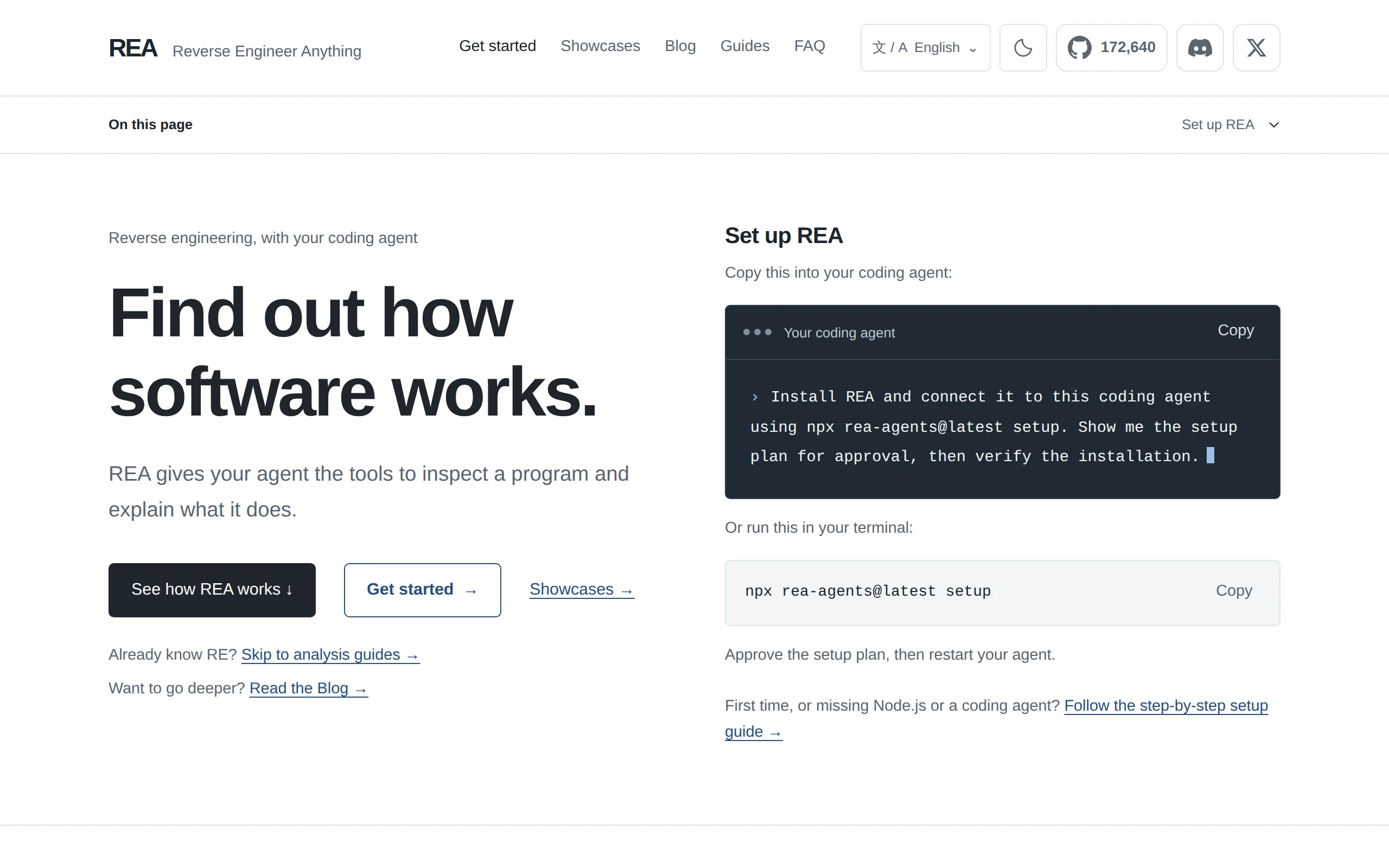
REA (Reverse Engineer Anything) is an open-source general-purpose reverse analysis tool that connects AI programming agents such as Claude Code, Codex, and Cursor with professional reverse engineering...
1. What is REA
REA (Reverse Engineer Anything) is an open-source general-purpose reverse analysis tool that connects AI programming agents such as Claude Code, Codex, and Cursor with professional reverse engineering tools like Ghidra, Hopper, and IDA via the MCP (Model Context Protocol). This allows agents to perform in-depth analysis of software without access to source code. REA supports over 15 target types, ranging from native binaries, Electron/JS applications, APKs, .NET assemblies, to websites, firmware, and WASM. It can trace the implementation logic of features and generate analysis results with an evidence chain, thereby assisting developers in reconstructing similar functionalities.
Technical positioning and domain: REA lies at the intersection of software reverse engineering and the AI Agent toolchain. Its core positioning is to act as a "reverse orchestration layer," bridging the natural language understanding capabilities of AI agents with the low-level analysis power of professional reverse engineering engines. It does not replace Ghidra or IDA, but instead uses the MCP protocol as a link to enable agents to automatically orchestrate these tools for analysis tasks.
Development background: REA was initiated and open-sourced by developer morluto, using the MIT license. Its development was driven by the contradiction of high barriers to entry in reverse engineering—traditional reverse engineering requires deep knowledge of assembly language and decompilation, while AI agents, although capable of understanding code, lack a standard interface for directly invoking professional reverse engineering tools. REA was created precisely to bridge this gap.
Core value: The core value of REA lies in transforming reverse analysis from an "expert operation" into a "natural language conversation." Users no longer need to understand disassembly, calling conventions, or binary formats. They simply describe the analysis goal to the agent, and REA automatically handles tool orchestration, data extraction, and evidence organization. Moreover, all analysis runs locally, ensuring the security of the target software and preventing sensitive code from being uploaded to the cloud.
Technical features: REA employs a multi-engine orchestration architecture, compatible with mainstream reverse engineering tools such as Ghidra, Hopper, IDA, JADX, and JEB at the lower level. It outputs structured data such as pseudocode, assembly, call relationships, and strings through a unified interface. Additionally, its evidence chain mechanism attaches traceable original evidence to each analysis conclusion, significantly enhancing the verifiability of the results.
2. Key Features
Native Binary Analysis: Parses executable file formats such as Mach-O, ELF, and PE, returning pseudocode, assembly instructions, string constants, symbol tables, and call graph relationships. This feature supports deep decompilation, providing Agent with full function logic reconstruction, suitable for malware analysis and understanding closed-source programs.
JavaScript/Electron Application Analysis: Static analysis of JS applications to map out module structures, entry files, IPC communication channels, and source maps, without the need to run the application. This feature is especially effective for auditing desktop Electron applications, revealing data flow between preload scripts and the main process.
Android Application Reverse Engineering: Decompiles APK files using JADX to extract manifest declarations, class structures, method implementations, and resource references. It also supports connecting to Android devices via ADB to retrieve device information, process lists, log outputs, and screenshots, enabling a combined dynamic and static analysis approach.
.NET Assembly Inspection: View metadata, CIL (Common Intermediate Language) instructions, and native code boundaries of .NET assemblies without executing the program. This helps analyze interaction points between managed code and native code, useful for security audits and dependency analysis of legacy .NET systems.
Firmware and Package File Analysis: Uses Binwalk or Unblob tools to extract firmware partitions and filesystem images, or directly generates file listings for archive formats such as ZIP, APK, and ASAR. This feature covers scenarios for firmware analysis in IoT devices and reviewing the structure of installation packages.
Version Difference Comparison: Compares binary differences between two versions of the same application and automatically generates a change report that includes newly added, deleted, or modified functions and resources. This feature is practically useful for evaluating the impact scope of software updates and tracking the effectiveness of security patches.
Network Packet Analysis: Parses HAR files or data captured by mitmproxy, correlating network requests with source code locations to reveal the application's network communication patterns and API calling logic, supporting data flow analysis for frontend applications.
Code Reconstruction Assistance: Based on the analysis results provided by REA, Agent traces implementation clues for the target functionality, automatically writes functionally equivalent implementations, and verifies them. This feature directly transforms reverse engineering analysis into development capabilities, shortening the path from "understanding" to "implementation."
3. How to Use
Environment Setup: Install Node.js (≥22.19 version) and the npm package manager. Additionally, you need to have one of the supported AI programming agents installed, such as Claude Code, Codex, Cursor, Gemini CLI, or Windsurf. The operating system supports Linux, macOS, and Windows (some features like process capture are limited to Linux/macOS only).
One-Click Installation: Execute the command
npx rea-agents@latest setupin the terminal, and follow the prompts to select the agent you want to integrate. The installation script will automatically register the MCP server and configure the workflow instruction file for the agent. Before proceeding, it will display the configuration items to be modified for user review and confirmation.Approve Configuration and Restart: Confirm the MCP server registration information and workflow instruction modifications proposed by the setup (the tool will automatically back up the original configuration file). After configuration is complete, you need to restart the corresponding AI programming agent to activate the newly added MCP tool.
Prepare Reverse Engineering Engine (Optional): If you plan to perform in-depth native binary analysis (such as ELF, PE, Mach-O), you must pre-install at least one of the tools: Hopper, Ghidra, or IDA. REA will automatically detect and schedule the installed engines; no additional installation is required for pure JS/Electron or .NET analysis. If you need to analyze Android APKs, you must prepare JADX and JDK yourself; for firmware analysis, you need to install Binwalk.
Natural Language Inquiry: Describe the analysis goal to the configured agent in natural language, for example, “Analyze how the search function in the Notes app works, present the evidence, and implement a similar feature for my project.” The agent will invoke REA locally via the MCP protocol to perform the analysis task, returning pseudocode, call chains, and functional logic descriptions with evidence chains.
Result Verification and Iteration: Manually review the analysis results returned by REA to ensure the completeness of the evidence chain. If the analysis depth is insufficient, you can directly call REA's fine-grained capabilities through the CLI tool (such as specifying a function for decompilation or exporting a specific section), or re-run the analysis after adjusting the analysis strategy.
4. Pros and Cons Analysis
| Pros |
|---|
| Supports Multiple Target Types: Supports over 15 target types, including native binary, Electron/JS, APK, .NET, firmware, WASM, and EVM bytecode. Its coverage far exceeds that of single-purpose tools, meeting the majority of reverse engineering analysis needs. |
| Zero Reverse Engineering Experience Required: Users can drive the analysis process using natural language, without needing to know assembly language or decompilation techniques. This significantly reduces the learning curve of reverse engineering, allowing non-expert developers to complete complex analysis tasks. |
| Evidence-Driven Results: Each analysis conclusion is accompanied by original evidence such as pseudocode, assembly instructions, and call relationships, with limitations clearly noted. This makes the results traceable and verifiable, avoiding errors caused by AI hallucinations. |
| Local Analysis Protects Privacy: All reverse engineering processes are completed on the local computing device. The target software and code are not uploaded to the cloud, effectively avoiding the risk of sensitive code leakage, making it suitable for enterprise security audits. |
| Good Compatibility with Agent Ecosystems: Supports mainstream AI coding tools such as Claude Code, Codex, Cursor, Gemini CLI, and Windsurf through the MCP standard protocol. Once configured, it can be reused across multiple agents. |
| Open Source and Free: Fully open-sourced under the MIT license, allowing free access, modification, and commercial use of the code. The community can contribute to improvements and extensions, reducing the cost of enterprise adoption. |
5. Comparative Analysis with Similar Tools
| Comparison Dimension | REA | GhidraMCP | IDA Pro + MCP Bridge |
|---|---|---|---|
| Core Architecture | Multi-engine scheduling layer, unified scheduling of Ghidra/Hopper/IDA/JADX/JEB, etc. | Dedicated MCP bridge (plugin + Python/Go bridge) bound only to Ghidra | MCP interface encapsulation based on IDA Pro |
| Analysis Target Scope | 15+ types: native binaries, Electron/JS, APK, .NET, websites, firmware, WASM, EVM, etc. | Limited to native binaries supported by Ghidra | Primarily native executables such as PE/ELF/Mach-O |
| Agent Integration Method | One-click setup automatically registers Claude Code, Codex, Cursor, etc. | Theoretically supports any MCP client but requires manual configuration of bridge scripts | Requires self-hosting of MCP service and client configuration |
| Installation Experience | npx rea-agents@latest setup single command completes installation and configuration |
Requires installing Ghidra plugins, running bridge scripts, and manually editing client configuration files | Depends on IDA commercial license, requires additional bridge service development |
| Workflow Depth | End-to-end automation: analysis → trace call chains → generate similar implementations → verify | Focuses on analysis phase: decompilation, symbol renaming, import/export lists, code annotation | Strong decompilation and debugging capabilities, but no code generation phase |
| Evidence Chain Structuring | Each conclusion is accompanied by pseudocode, assembly, call relationships, etc., along with evidence and limitations | Returns decompilation results and symbol information, with low level of structured evidence | Returns decompilation and cross-reference data, requiring manual organization |
| Protocol/License | MIT open source and free | Apache-2.0 open source and free | Commercial license |
| Community Ecosystem | Emerging open source project, in rapid iteration phase | Moderate community activity, relying on the Ghidra ecosystem | Comprehensive commercial support, rich community resources |
Selection Recommendations: For developers aiming to achieve "natural language-driven reverse analysis" with the lowest learning cost, REA is the most suitable option. It has clear advantages in target type coverage, Agent integration convenience, and end-to-end automation, especially for complex scenarios requiring analysis of multiple software types (e.g., Electron applications + native modules + APK). If only deep reverse engineering of native binaries is needed and the team is already familiar with Ghidra, GhidraMCP serves as a more direct lightweight bridging solution. For enterprise-level security research teams, IDA Pro paired with an MCP bridge offers stronger decompilation quality and debugging capabilities, but the cost of commercial licensing must be considered. If maximum analysis control is desired without reliance on AI agents, traditional manual analysis with Ghidra remains a reliable choice.
6. Editor's Summary
The emergence of REA brings methodological innovation to the field of reverse engineering. Traditional reverse analysis heavily relies on manual expertise, requiring professional knowledge and significant time for each step—from loading binary files to locating key functions and understanding call relationships. REA integrates the semantic understanding capabilities of AI Agents with the underlying functionalities of mature reverse engineering engines through the MCP protocol, compressing this entire process into natural language dialogue, thereby effectively reducing the professional barrier in reverse engineering.
From a technical implementation perspective, REA's multi-engine scheduling architecture demonstrates strong scalability—its unified interface is compatible with tools such as Ghidra, Hopper, IDA, JADX, and JEB, avoiding the limitations of single-tool capabilities. Its coverage of over 15 target types is relatively rare among open-source tools of the same category, especially its inclusion of static analysis for Electron/JS applications and passive observation of websites, which fills a gap in traditional reverse engineering tools for analyzing modern multi-type applications. The design of the evidence chain mechanism is also commendable, as each conclusion is accompanied by traceable original evidence, which to some extent mitigates the potential hallucination issues that AI models may encounter during analysis.
In terms of practical value, REA is applicable to a variety of real-world scenarios: security auditors can quickly assess the security status of closed-source applications; development teams can extract functional logic from competitor implementations for reuse; maintenance teams can technically reconstruct legacy systems that have lost their source code. Its local deployment capabilities also align with enterprise requirements for code privacy.
The primary users of REA include: security engineers who wish to enhance reverse engineering efficiency with AI, software developers who need to analyze the implementation logic of third-party applications, and technical decision-makers involved in legacy system migration. For professional reverse engineers, REA can serve as an auxiliary tool to accelerate initial analysis, but deep manual reverse engineering still requires reliance on specialized tools.
As an open-source project, REA is still in a rapid iteration phase, and its long-term development depends on community contributions and ecosystem building. As AI programming agents become more widespread and the MCP protocol ecosystem matures, the "AI + professional tool" bridging paradigm exemplified by REA is expected to become an important direction in the field of software analysis and understanding.
7. Application Scenarios
Competitor Feature Recreation: When a development team identifies a particular feature in a competitor's application (such as offline search, data synchronization mechanisms), they can use REA to have the Agent analyze the target feature's call chain and implementation logic, obtaining pseudocode with evidence. Based on the analysis results, the team can then implement an equivalent version of the feature in their own project. This scenario significantly shortens the time required for feature reverse engineering and reimplementation.
Legacy Software Rescue Without Source Code: When enterprises face the need to maintain legacy systems (old software, old games, historical library files) without access to the source code, REA can be used to read pseudocode and assembly instructions. The Agent can then reconstruct the implementation methods of key algorithms and data structures, and migrate the analysis results to a modern technology stack for rebuilding, thereby reducing the risk of system obsolescence.
Electron/Desktop Application Security Audit: Security teams use REA to perform static analysis on closed-source desktop applications. This allows them to quickly map out module structures, route definitions, IPC communication channels, and the content of preload scripts, assessing whether there are potential issues such as sensitive information leakage, improper permissions, or suspicious communication behaviors, providing a basis for security decisions.
Legacy System Migration Assessment: During system upgrades or technology stack replacements, REA can be used to generate a change report by comparing the binary differences between two software versions, or to analyze the dependency boundaries of .NET/native components. This clarifies which modules need to be rewritten and which can be directly encapsulated and reused, assisting in the formulation of migration plans and risk assessments.
8. FAQ
Q1: Which AI Agents can use REA?
A: Any AI programming agent that supports a local MCP server can integrate with REA. The REA setup command automatically configures verified agents (such as Claude Code, Codex, Cursor, Gemini CLI, Windsurf). Other MCP-compatible clients can manually register the MCP server by following the documentation.
Q2: Is it necessary to install Hopper, Ghidra, or IDA?
A: At least one of the above tools is required for deep native binary analysis (such as ELF, PE, Mach-O). If you're only performing static JavaScript/Electron analysis or checking .NET assemblies, no native analysis engine is needed. The setup command can automatically install Hopper with user approval; Ghidra and IDA use existing installations by the user.
Q3: Do I need to start Hopper before analysis?
A: No. REA will automatically launch Hopper when needed. However, on macOS, during the first run, a dialog will appear asking the user to select demo mode or activate a license. The user must complete this prompt in the same session before proceeding with subsequent CLI/MCP operations.
Q4: What format are the analysis results returned by REA?
A: Native binary analysis returns pseudocode and assembly instructions; JavaScript/Electron analysis recovers module structure and dependencies. All analysis results are accompanied by evidence information (such as address references, call chains), which the agent uses to write and test implementation code for the target functionality.
Q5: Does REA upload the target software to the cloud?
A: No. All analysis processes are completed locally on the computing device. The target software and code are not uploaded to the cloud. Only the user-configured AI agent receives the analysis results returned by the tool. The data processing policies of the model providers are determined by the service terms of their respective platforms.
Q6: How to update REA or troubleshoot issues during use?
A: CLI users can run the rea update command to update the version; npx users should re-run npx rea-agents@latest setup and restart the agent. If the issue persists, it is recommended to submit an issue on the GitHub repository, including version information, target file type, reproduction steps, and full error output.
Q7: What special formats can REA analyze?
A: In addition to common formats, REA supports WASM files (requires the WABT tool), EVM bytecode (requires a Linux x64 environment), Go binaries (with built-in static ELF/PE/thin Mach-O checks), Linux crash logs (requires pwntools), and JEB project files (requires the caller to start the JEB client and configure the MCP connection).
9. Project Links
- Project Website: https://rea.tools/
- GitHub Repository: https://github.com/morluto/rea
Related AI Model Articles
QwenGyre – The Online Reinforcement Learning Framework for Long-Horizon Agents Launched by Alibaba Qwen
QwenGyre is an online reinforcement learning framework introduced by the Alibaba Qwen team, specifically designed for long-horizon agent tasks that involve executing approximately 700,000 tokens in a ...

Poppy – A Joint Open Protocol Draft by Sierra and Meta
Poppy (Personal Agent Protocol) is an open protocol draft jointly launched by Sierra along with Meta and multiple enterprises, aiming to address the identity verification and authorization issues when...
In-Depth Review of Clef – Cloudflare's Open-Source Decision Model Family
Clef is a family of decision models open-sourced by Cloudflare. Its core purpose is not to generate open-ended text, but to temporarily define problems within requests and output probabilistic scores ...
In-Depth Review of Mellum2.1: A Technological Leap in JetBrains' Open-Source Agentic Coding Model
Mellum2.1 is an open-source AI programming model launched by JetBrains, built on a 12B Mixture-of-Experts (MoE) architecture, activating only 2.5B parameters during each inference. The core breakthrou...
© All Rights Reserved. Some content on this site is partially generated by AI with human review.