
Ming-Image-0.1-Design: Ant Group Open-Sources 6B Parameter Image Generation Model, End-to-End Reimagining the Design Workflow
Executive Summary:
Ming-Image-0.1-Design is a 6B parameter image generation model open-sourced by Ant Group's InclusionAI team, specifically tailored for design scenarios. It supports 8K long, structured prompts and can...
1. What is Ming-Image-0.1-Design
Ming-Image-0.1-Design is a 6B parameter image generation model open-sourced by Ant Group's InclusionAI team, specifically tailored for design scenarios. It supports 8K long, structured prompts and can end-to-end generate complete visual designs such as UIs, infographics, and posters. When used in conjunction with the simultaneously open-sourced Design-Layer model, this tool can decompose design images into 2–9 independently editable transparent layers, enabling a full workflow from "generation—layering—editing—delivery." Ming-Image-0.1-Design has ranked first on the Artificial Analysis UI/UX open-source leaderboard and has been integrated into real-world applications such as Lingguangshan and Hua Mei.
Image source: Official article
Image source: official article
Technical positioning and domain: It belongs to the generative AI image generation domain, focusing on the direction of design automation. This model is not a general-purpose text-to-image tool, but rather a specialized model optimized for structured visual content such as UI design, infographics, and posters. Its core differentiator lies in "editability"—the generated output is no longer a flat image, but rather design assets that can be decomposed, modified, and delivered.
Development background: Developed by the InclusionAI team at Ant Group, based on the team's technical expertise in image generation, multimodal understanding, and design toolchains. The motivation for development stemmed from the pain points of traditional AI image generation, which produces "one-time outputs that are not editable," and the long chain from concept to delivery in the design industry. The team aims to reduce the barriers to design automation through an open-source model and its accompanying toolchain.
Core value: It addresses three key issues: first, the lack of long prompt understanding capability, which makes it difficult to fully express complex design requirements; second, the inability to edit generated results, making it hard to integrate into professional design workflows; third, the broken delivery pipeline from design images to functional frontend pages or PPTs. Through 8K prompts, RGBA VAE, and layering models, the generated results are transformed into design materials that can be further processed.
Technical features: The self-developed native RGBA VAE allows the generation space to directly cover transparent background materials, eliminating the need for post-processing to remove backgrounds; Type Token layer role constraints and Alpha-Aware Layer Optimization ensure layering quality; Composite-Layer Stack Consistency constraints ensure that the image is highly accurate when layers are recombined. The 6B parameter count strikes a balance between performance and deployment cost.
2. Key Features
Text-to-Design: Supports 8K long structured prompts, enabling the model to automatically organize user needs into structured inputs across four dimensions: copy, modules, layout, and visual style. It generates complete visual designs such as UI, dashboards, infographics, and posters directly from textual requirements. Information within long prompts is fully understood and executed, ensuring accurate presentation of multiple modules and elements in complex pages.
Text and Layout Rendering: Specialized optimization for text presentation in titles, buttons, cards, and multi-region information, ensuring layout stability and accurate information arrangement. This capability is often weak in traditional text-to-image models, but Ming-Image enhances text generation quality through specialized training, making text content in design images clear, readable, and precisely positioned.
Global Style Consistency: Unlike the approach of generating backgrounds, illustrations, and decorations separately and then assembling them, the model coordinates global layout, color schemes, and material styles during a single generation process. Through specialized training, it strengthens the ability to generate text, layouts, and multi-element combinations, fundamentally reducing color scheme conflicts and inconsistent visual styles between materials, and avoiding style fragmentation and template-like outputs caused by multiple generations.
Transparent Material Generation: Native RGBA VAE enables the generation space to directly support transparent background materials. Characters, products, icons, and decorations can be output with an Alpha channel. The self-developed VAE with Alpha channel support allows transparent materials to enter the design workflow directly without requiring post-processing for masking, significantly improving material production efficiency.
Design Layers (Layer): The Design-Layer model can decompose a design image into 2–9 semantically independent RGBA layers, supporting individual modification, movement, and replacement of text, main elements, and background. By using Type Tokens to explicitly indicate the design role of each layer, the model is guided to split based on semantics, ensuring that the resulting layers are clear and have independent responsibilities. It achieved first place in all 12 metrics of the Crello-Test.
Frontend Delivery (Design Skill): In Text-to-Page mode, the design proposal is generated first, followed by code writing. Users can see the page layout within about 15 seconds after inputting their requirements, and once confirmed, the layout is handed over to the Coding module to generate a functional page. Visual Coding mode supports reconstructing a functional page from screenshots of the design draft. This connects the automated pipeline from design to frontend code.
PPT Delivery (PPT Skill): Converts text, color blocks, and layouts from images into editable elements in PowerPoint, with icons and illustrations directly extracted for reuse. Users can continue to modify copy, color schemes, and layouts within PowerPoint, enabling a rapid transition from design images to editable presentation documents.
3. How to Use
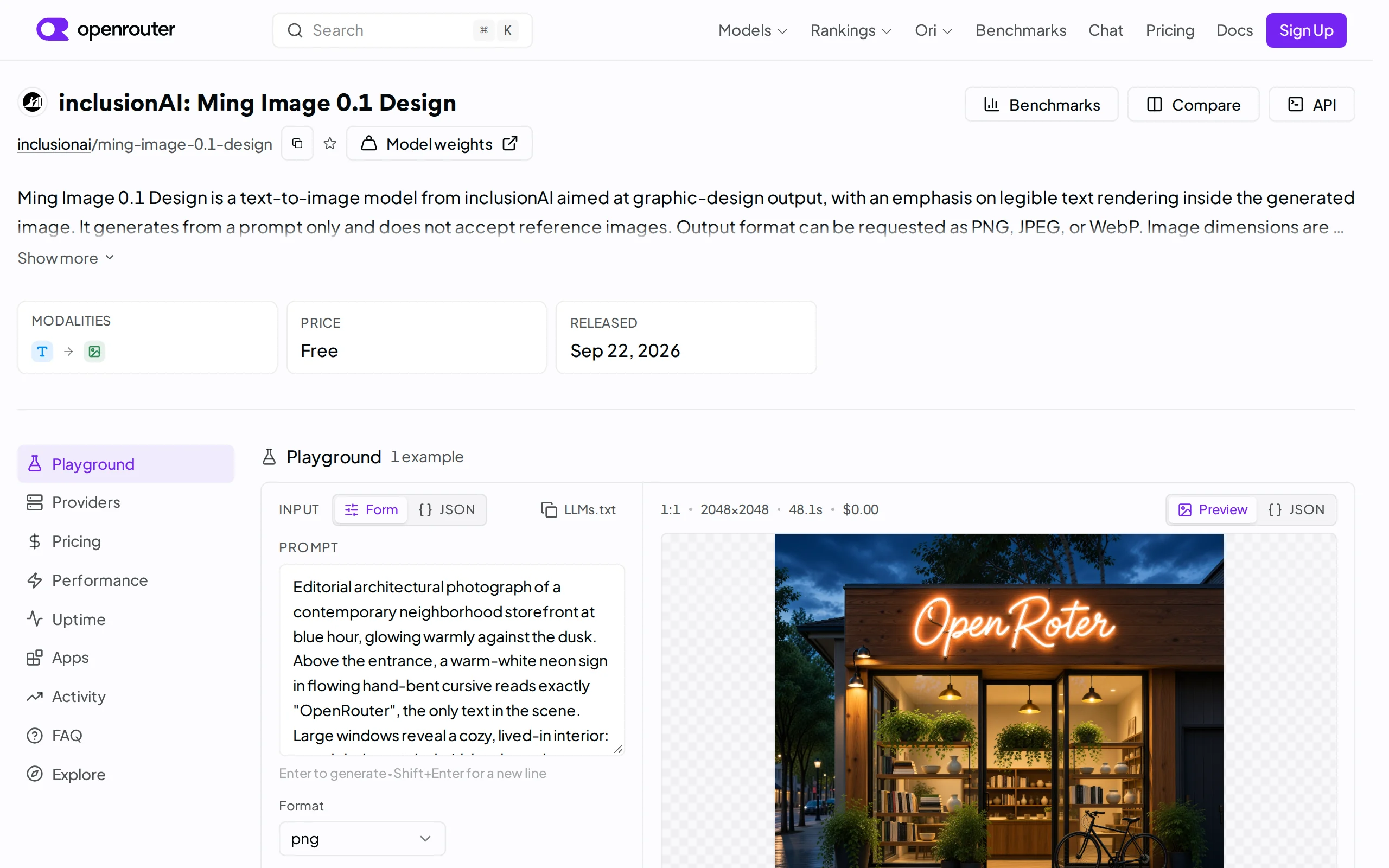
Choose Integration Method: You can quickly experience the model via the free online API at OpenRouter (https://openrouter.ai/inclusionai/ming-image-0.1-design), without the need for local deployment; alternatively, you can download the model weights from Hugging Face or ModelScope for local deployment. For local deployment, it is recommended to use a GPU with at least 16GB of VRAM, as the model has 6B parameters.
Write Prompts: Describe your design requirements in natural language. It is recommended to structure the content across four dimensions: "copywriting, modules, layout, and visual style," to fully leverage the 8K long prompt capability. For example, describe the page's purpose, the modules it should include, your overall layout preferences, and your inclination toward a particular visual style. The model will automatically organize these requirements into structured input.
Generate Design: Call the Design model to generate a complete visual design, such as a UI, infographic, or poster, in one go. The model will coordinate the global layout, color scheme, and material style during the generation process. The complete result is returned in approximately 20 seconds (after engineering optimization), without the need for multiple generations and manual assembly.
Decompose Layers: Input the generated design or an existing design into the Design-Layer model to split it into 2–9 independently editable transparent layers. Layers are organized by design roles, supporting individual modification, movement, and replacement of text, main elements, and background. The Alpha-Aware optimization ensures clean transparent edges with no residue.
Frontend Delivery: Obtain the Design Skill from GitHub (ling-cookbook). Input your requirements, and the system will generate a preliminary page layout in about 15 seconds. Once confirmed, hand it over to the Coding model to generate a functional webpage. Alternatively, you can input a design draft or screenshot, and after decomposing the layers and extracting materials, the system will automatically generate a functional frontend page and perform automatic verification and correction via screenshot comparison.
PPT Delivery: Use the PPT Skill (ling-cookbook) to convert the design into an editable PowerPoint slide with one click. Text, color blocks, and layout can be further modified, while icons and illustrations can be directly extracted and reused. This is ideal for scenarios where you need to quickly convert visual designs into presentation documents.
4. Pros and Cons Analysis
| Pros |
|---|
| High performance with small parameters: With 6B parameters, it achieved full victories (12/12, 10/10) against larger models such as Nano Banana 2 and FLUX.2 in complex UI tasks, ranking first on the open-source UI/UX leaderboard of Artificial Analysis, demonstrating excellent parameter efficiency. |
| End-to-end style consistency: It generates the overall layout, color scheme, and visual style in one go, avoiding style fragmentation and template-like outputs caused by multiple generations. This fundamentally reduces color conflicts and inconsistencies between materials. |
| Strong design editability: The Layer model decomposes design images into semantically independent RGBA layers, achieving first place in all 12 indicators of Crello-Test. The transparent edges are clean with no residue, and the image is highly accurate when reassembled, allowing the generated results to be further edited. |
| Fast speed and low cost: It is approximately 4.3 times faster than the 20B Qwen open-source version (183 seconds per inference vs. 795 seconds), and with engineering optimizations, it can generate images in about 20 seconds. The cost of modifying text is only 1/7 that of GPT-image2, making it suitable for design scenarios requiring frequent iterations. |
| Complete delivery pipeline: When paired with Design Skill and PPT Skill, it can generate frontend pages and editable PPTs directly from text or reference images. The time to first visible result is reduced from 5 minutes to 15 seconds, significantly shortening the design delivery cycle. |
5. Comparative Analysis with Similar Tools
| Comparison Dimension | Ming-Image-0.1-Design | Qwen-Image-Layered | Nano Banana 2 |
|---|---|---|---|
| Parameter Count | 6B | 20B | Approximately 12B |
| Core Architecture | Native RGBA VAE + Type Token Layer Constraints + Composite-Layer Reorganization Consistency | Layered generation architecture, with weaker semantic role constraints on layers | General text-to-image architecture, does not support native layering |
| Performance on Complex UI Tasks | 12/12, 10/10 wins against all competitors, leading the open-source UI/UX benchmark on Artificial Analysis | Lags behind Ming-Image comprehensively | Defeated by Ming-Image |
| Layering Capability | 2–9 semantically independent RGBA layers, organized by design roles, achieving first place in all 12 Crello-Test metrics | Layers are decoupled, with weaker semantic role constraints, and more edge residue in complex occlusions | Does not support design layering |
| Single Inference Time | 183 seconds (approximately 20 seconds after engineering optimization) | 795 seconds | To be officially announced |
| Delivery Pipeline | Design Skill (frontend) + PPT Skill, generating directly from text to editable and runnable pages and PPTs | No accompanying delivery tools | No accompanying delivery tools |
| Deployment Method | Open-source weights, supports local deployment or OpenRouter online API | Open-source weights, supports local deployment | Closed-source API |
| Open Source License | Open-source (all weights and Skills are open-sourced) | Open-source | Closed-source |
| Community Ecosystem | Newly open-sourced, community ecosystem under development | Relies on Qwen ecosystem, with an active community | Relies on Google ecosystem |
Selection Recommendations: For design automation scenarios, Ming-Image-0.1-Design demonstrates clear advantages in layering capabilities and delivery pipeline, especially suitable for teams that need to further edit and deliver AI-generated results as frontend pages or PPTs. Its 6B parameter count offers greater competitiveness in deployment cost and inference speed, making it the preferred choice for integration into design toolchains. Although Qwen-Image-Layered has a larger parameter count, it lags behind in layering quality and inference speed, making it more suitable for scenarios with specific parameter size requirements.
For general image generation needs, Nano Banana 2 and FLUX.2 may offer more balanced performance in realistic and artistic creation domains. However, they lack design layering and delivery capabilities. If the user requires "one-time image generation" rather than "editable design assets," these two models remain reliable choices. If the team already has a design toolchain and needs AI generation capabilities, Ming-Image-0.1-Design's open-source weights and accompanying Skills provide a more complete solution.
6. Editor's Summary
The technical innovation of Ming-Image-0.1-Design is reflected in three aspects: first, the native RGBA VAE design allows the generation space to directly cover transparent background materials, bypassing the traditional post-processing step of "generating—extracting," which represents a substantive architectural improvement rather than an engineering optimization. Second, the Type Token layer role constraints and the Composite-Layer Stack Consistency constraints jointly address the industry pain point of AI-generated content being non-editable, elevating the generation results from "images" to "design assets." Third, with only 6B parameters, the model outperforms models with several times more parameters in complex UI tasks, validating the feasibility of the "small parameters + specialized optimization" approach in vertical scenarios.
In terms of practical value, the most notable contribution of this model is that it connects the complete delivery pipeline from "textual requirements—visual design—editable layers—frontend code/PPT." Traditional AI image generation tools output final products, whereas Ming-Image-0.1-Design outputs semi-finished products that can be further processed, a positioning that better aligns with the actual workflow of the design industry. Data such as the text revision cost being only 1/7 of GPT-image2 and the time to first result dropping from 5 minutes to 15 seconds demonstrate its quantifiable advantages in terms of efficiency.
In terms of target users, this model is suitable for three categories: first, AI application developers who can quickly generate visual previews before an Agent writes code; second, professional designers who can refine posters and main visuals by decomposing AI-generated content into editable layers; and third, product managers and operations personnel who need to rapidly produce PPTs or frontend pages. For artists or photography enthusiasts seeking ultra-realistic results, this model is not the first choice.
In terms of future development potential, as design layering capabilities and delivery toolchains continue to improve, AI-generated content is expected to be more deeply integrated into professional design workflows. The open-source strategy reduces integration barriers, and the growth of the community ecosystem will determine how far it can go. Ming-Image-0.1-Design represents a direction: the goal of AI image generation is not to replace designers, but to automate repetitive tasks within the design process, allowing designers to focus on creative decision-making.
7. Application Scenarios
AI Application Preview Generation: Before the Agent writes code, the Design module generates a visual preview of the application, allowing users to confirm the design direction in advance and achieve a "what you see is what you get" experience. Product managers can describe functional requirements in natural language, and the model generates a UI preview image. Once confirmed, development can proceed, avoiding the need for redesign after development is complete and significantly reducing communication and rework costs.
Professional Design Layer Editing: Designers can decompose posters and e-commerce main visuals into editable layers with one click. They can modify text, move the main subject, and replace the background in about 40 seconds, and then export as PSD. For example, when an e-commerce promotional poster needs to update product images and price copy, there's no need to redesign from scratch—modifications can be made directly on the decomposed layers, greatly improving design iteration efficiency.
Front-end Page Reconstruction (Visual Coding): By inputting a design draft or screenshot, the system automatically generates a runnable front-end page after decomposing the layers and materials. It also automatically validates and corrects the output by comparing it with the original screenshot. Front-end developers can directly convert design drafts into page code, reducing the repetitive work of manually writing HTML/CSS from design drafts. This is especially suitable for quickly generating standardized pages such as landing pages and promotional pages.
PPT Rapid Replication: Convert a design image into an editable PowerPoint page, where text, color schemes, and images can be further modified, and icons and illustrations can be directly extracted and reused. When market or operations personnel see an excellent poster or infographic, they can quickly convert it into an editable PPT template, preserving the visual style while replacing it with their own content.
8. FAQ
Q: What is the fundamental difference between Ming-Image-0.1-Design and general text-to-image models (such as Stable Diffusion, FLUX)?
A: General text-to-image models generate flat images that are not editable; Ming-Image-0.1-Design generates "design assets" — when used with the synchronously open-sourced Design-Layer model, the generated results can be decomposed into 2–9 semantically independent RGBA transparent layers, allowing for individual modification of text, subject, and background. Additionally, this model has been specifically optimized for structured design scenarios such as UI, infographics, and posters, performing better in text rendering, layout stability, and global style consistency, while general models may excel in realistic and artistic creation scenarios.
Q: How does the 8K long prompt capability manifest in practical use?
A: Traditional text-to-image models often suffer from "selective blindness" when processing prompts longer than a few hundred words, failing to fully execute the information in long prompts. Ming-Image-0.1-Design automatically organizes user needs into structured input across four dimensions: copy, modules, layout, and visual style, enabling complete understanding and execution of information in prompts up to 8K in length. In practice, it is recommended to structure prompts according to these four dimensions, such as describing the page's purpose, included modules, layout preferences, and visual style, allowing the model to more accurately generate complex pages with multiple modules and elements.
Q: What hardware configuration is required for local deployment?
A: The model has 6B parameters and is recommended to be run on a GPU with 16GB or more of VRAM. After engineering optimization, a complete result is generated in approximately 20 seconds per inference. For users with insufficient hardware, the OpenRouter online free API (https://openrouter.ai/inclusionai/ming-image-0.1-design) can be used without local deployment. The model weights are open-sourced, supporting the free construction of design tools.
Q: How can generated design images be delivered as frontend pages or PPTs?
A: You can obtain Design Skill and PPT Skill (ling-cookbook) via GitHub. Design Skill supports Text-to-Page mode (generating a page layout in about 15 seconds based on input requirements, then generating a functional page upon confirmation) and Visual Coding mode (reconstructing a functional page from a design draft screenshot). PPT Skill can convert text, color blocks, and layouts from the design image into editable PowerPoint elements, with icons and illustrations directly extracted for reuse.
Q: What is the open-source license for the model? Can it be used for commercial purposes?
A: The weights and Skills of Ming-Image-0.1-Design are fully open-sourced and support both commercial and academic use. Users can download the model weights from Hugging Face or ModelScope for local deployment and secondary development, or quickly integrate them using the OpenRouter online API. The open-source strategy reduces deployment and customization costs, making it suitable for teams building their own design toolchain.
9. Project Links
- Online Experience API (OpenRouter): https://openrouter.ai/inclusionai/ming-image-0.1-design
- Hugging Face Model Repository: https://huggingface.co/inclusionAI/Ming-Image-0.1-Design
- Hugging Face Hierarchical Model: https://huggingface.co/inclusionAI/Ming-Image-0.1-Design-Layer
Related AI Model Articles
Ok Work – Baidu's AI On-the-Go Office Tool
Ok Work is Baidu's lightweight AI on-the-go office tool, running in the form of a WeChat Mini Program, targeting students and new professionals, and focusing on fragmented office scenarios. The produc...

Step Code – In-Depth Review of StepFun's Open-Source Terminal Programming Agent
Step Code is an open-source terminal programming agent launched by StepFun, licensed under the MIT License, which allows developers to complete the full workflow of code writing, debugging, execution,...
In-Depth Review of Claude Opus 5.5: A Revolution in Programming Efficiency and Safety for Anthropic's Flagship Model
Claude Opus 5.5 is the first flagship model in Anthropic's Claude 5.5 series, launched in June 2026. It is positioned as a high-end AI model designed for enterprise-level agent programming, complex kn...
NeoHorse-1 – TokenRhythm Collaborates with Wuwenxinqiong and Others to Launch Open-Source Agent Model
NeoHorse-1 is an open-source Agent model series jointly developed by TokenRhythm, Wuwenxinqiong, Tsinghua University, Peking University, The Chinese University of Hong Kong, and Alibaba. It includes t...
© All Rights Reserved. Some content on this site is partially generated by AI with human review.