
YoVoice – Open-Source Local Audio Creation Tool Covering the Full Workflow from Text-to-Speech to Music Composition
Executive Summary:
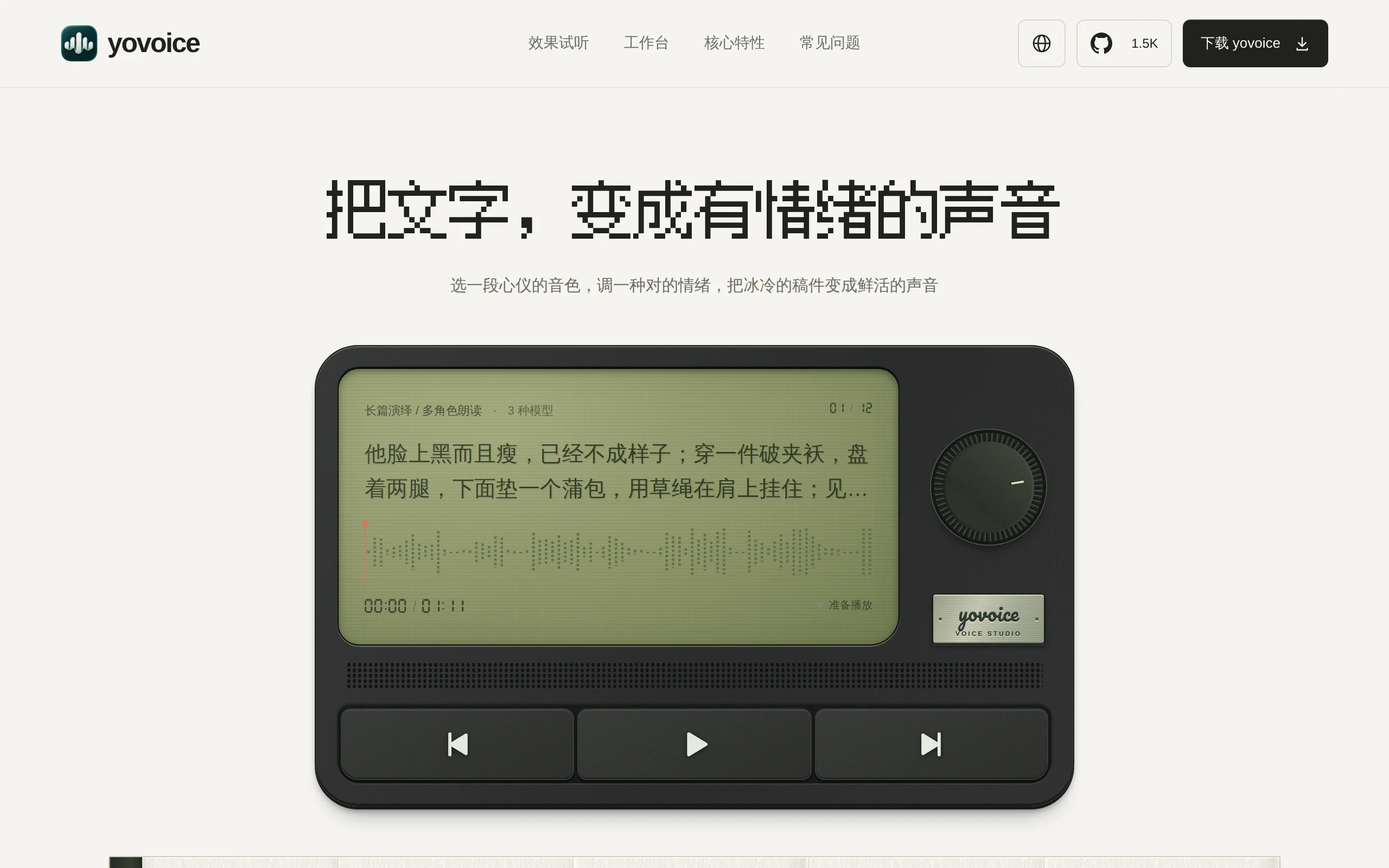
YoVoice is an open-source local audio creation tool designed for macOS and Windows platforms, developed by leemysw. It provides users with a complete creation workflow, ranging from text-to-speech (TT...
1. What is YoVoice
YoVoice is an open-source local audio creation tool designed for macOS and Windows platforms, developed by leemysw. It provides users with a complete creation workflow, ranging from text-to-speech (TTS), zero-shot voice cloning, to AI music composition and musical score notation. Built on the C++ inference engine audio.cpp, YoVoice does not require a Python environment setup, and it is ready to use after installation. All inference computations are performed locally on the GPU or CPU, without relying on any cloud-based API, ensuring the privacy and security of user audio data from the source. YoVoice integrates 13 mainstream open-source voice and music models, offering CLI and MCP service interfaces that can be directly invoked by AI agents, balancing ease of use for general content creators and extensibility for developers.
Technical positioning and domain: YoVoice is a localized creation tool in the field of audio synthesis and music generation, covering three key technical areas: text-to-speech (TTS), voice cloning, and music generation. Its unique feature lies in consolidating multiple previously fragmented open-source models into a single application framework, forming a complete creation workflow from "text → speech → song → musical score."
Development background: This project was led by independent developer leemysw, driven by the need to address practical pain points. Traditional open-source TTS tools often require users to manually configure a Python environment, manage dependency conflicts, and handle multiple model weights, which presents a high technical barrier. YoVoice overcomes these challenges by leveraging the C++ inference engine and a unified installation package, encapsulating complex technical details and significantly reducing the usage threshold for open-source audio tools.
Core value: This tool addresses three core issues: first, local privacy security, ensuring that all audio data and reference samples remain on the device, eliminating the risk of data leakage from cloud API calls; second, zero marginal usage cost, with no billing based on characters or minutes, avoiding escalating costs with frequent use; third, full functionality chain, integrating voice narration, voice cloning, music generation, and musical score composition into a single workspace, eliminating the hassle of switching between multiple tools.
2. Key Features
Text-to-Speech (TTS): Convert written content into natural and fluent speech output with one click, supporting multiple languages. Users can choose voice lines from different characters and adjust basic parameters such as speaking rate and pitch, making it suitable for various content production scenarios such as audiobooks, podcasts, and video dubbing.
Zero-shot Voice Cloning: Upload a reference audio clip of 3 to 10 seconds to replicate the voice, without the need for any targeted training. This feature addresses the issues of traditional voice cloning that require large amounts of sample data and long training cycles. Creators can use their own voice or the voice of a specific character for dubbing, while maintaining consistency across multiple characters.
Text-Guided Voice Design: Break through the limitations of traditional voice cloning by supporting the direct use of natural language to describe desired voice characteristics for generating entirely new voices. For example, inputting "a warm voice of a middle-aged man" or "a clear voice of a young woman" allows the system to generate the corresponding voice based on the description, offering creators greater flexibility.
Emotion and Tone Control: Users can import reference emotional audio or use text descriptions to adjust the emotional expression during the narration. The system parses emotional cues and maps them to speech synthesis parameters, enabling the generated speech to carry different emotional tones such as happiness, anger, sadness, or joy, which is more suitable for storytelling and role-playing content.
AI Music Generation: Input style prompts and lyrics with paragraph markers to generate complete songs that include vocal performances. Built-in with the ACE-Step 1.5 Turbo music generation model, it supports various music styles, allowing users to quickly produce music demos. This is ideal for independent musicians and content creators during the early stages of composition.
Sheet Music Composition: Offers a multi-track composition feature similar to a music score interface, where notes are written by measure and rendered using General MIDI timbres. It supports exporting to standard MIDI files and individual track audio (stems), providing an open-source alternative to traditional DAWs (Digital Audio Workstations) for music creators who need precise control over each note.
Multi-track Project Management: Supports four project types: "story dubbing," "voice generation," "music," and "sheet music." Multiple characters and versions can be viewed side by side for comparison. Each generated audio file is saved as an independent take, enabling users to generate multiple versions repeatedly and select the best result using the waveform editor and A/B comparison features.
Agent Integration Capabilities: Natively provides the MCP (Model Context Protocol) service and Agent Skill, which can be directly called by AI Agents. Developers can integrate YoVoice into their own AI applications or automated workflows, enabling programmatic use of speech synthesis and music generation.
3. How to Use
Environment Requirements: Supports both macOS and Windows platforms. macOS requires a newer version to enable Metal acceleration, while Windows is recommended to have an NVIDIA GPU to utilize CUDA 12.4/13.3 acceleration features. Inference can still be performed using CPU without a GPU, but generation speed will be slower.
Download and Installation: Go to the GitHub Releases page or the official website to download the installation package for your platform. Double-click the .dmg file (for macOS) or the .exe file (for Windows) to complete the installation. No Python installation, no Conda environment setup, and no dependency conflicts are required—the installation package is ready to use out of the box.
Download Models: After the first launch, go to the settings page and download the required models as needed. If you only need quick voice-over scenarios, you can download a lightweight model (e.g., Kokoro-82M, only 189MB). If you are aiming for high-fidelity voice cloning, consider larger models such as VoxCPM2 or IndexTTS. Downloads support resuming from a breakpoint.
Create a Project: Click the "New Project" button and choose one of the four project types based on your creative goals: "Story Dubbing" (multi-character dialogue scenarios), "Voice Generation" (single-character voice output), "Music" (song generation), or "Sheet Music" (MIDI composition).
Add Content and Generate: Input your script, lyrics, or musical notes, select an appropriate character voice, adjust parameters such as style and emotion, and then click the "Generate" button. Each generation result will be saved as an independent take, allowing you to generate multiple versions for comparison.
Edit and Export: Trim and adjust the generated audio in the waveform editor. Once satisfied, export it as WAV or MP3 format. For sheet music projects, you can export as MIDI or multi-track stems files, which are convenient for further mixing in other DAWs.
4. Pros and Cons Analysis
| Pros |
|---|
| Fully Local Execution: All inference computations are performed locally on the GPU/CPU, with zero cloud API calls. Reference audio and generated content never leave the user's computer, fundamentally eliminating privacy leakage risks. This is especially important for users handling sensitive content or business secrets. |
| Zero Usage Cost: Fully open-source and runs locally, eliminating per-character or per-minute billing and expensive cloud subscription models. High-frequency generation does not result in linearly increasing costs, making it ideal for creators and teams requiring large volumes of audio output. |
| Very Low Installation Barrier: Built on the C++ inference engine audio.cpp, the installation package is ready to use out of the box. No need to configure a Python environment, no Conda dependencies, and no version conflict issues, significantly reducing the difficulty for non-technical users to get started. |
| Complete Functional Chain: Covers the full process from text-to-speech, voice cloning, to AI composition and musical notation arrangement, spanning the entire "text → speech → song → sheet music" workflow. It also provides CLI and MCP service interfaces, supporting direct calls from AI Agents, and offers good scalability. |
5. Comparative Analysis with Similar Tools
| Comparison Dimension | YoVoice | CosyVoice | ChatTTS |
|---|---|---|---|
| Product Form | Local audio creation studio (desktop App + CLI + MCP, integrated with multiple models) | Single voice generation large model (requires self-deployment or API calling) | Open-source conversational TTS model (requires Python environment configuration) |
| Capability Scope | Voiceover + voice cloning + AI composition + full workflow for musical score arrangement | Focus on voice generation (TTS, voice cloning, instruction control, streaming output) | Focus on conversational scene TTS, supports fine-grained control |
| Underlying Technology | C++ inference engine (audio.cpp), encapsulating 13 open-source models | Self-developed CosyVoice 2/3 series models, Python + PyTorch ecosystem | Self-developed acoustic model, Python + PyTorch ecosystem |
| Installation Difficulty | Extremely low: double-click .dmg/.exe to use | High: requires Python environment configuration, deployment has a threshold | High: requires Python environment configuration and dependency handling |
| Music Generation | ✅ Built-in ACE-Step 1.5 Turbo, can generate complete songs | ❌ Not supported | ❌ Not supported |
| Score Arrangement | ✅ Staff notation writing, MIDI rendering and export | ❌ Not supported | ❌ Not supported |
| Agent Integration | ✅ Native MCP service + Agent Skill | ❌ No native MCP, requires self-encapsulation | ❌ No native MCP |
| Streaming Output | Primarily offline generation | ✅ Native support for low-latency streaming synthesis | ✅ Supports streaming synthesis |
| Target Users | Content creators, musicians (ready-to-use out-of-the-box) | Developers, researchers (requires technical skills) | Developers, researchers (requires technical skills) |
Selection Recommendations: For content creators, podcasters, and short video operators, YoVoice's full workflow local creation mode and zero usage cost offer clear advantages, allowing them to complete voiceover and music creation without dealing with complex deployment configurations. CosyVoice and ChatTTS are more suitable for developers with strong technical backgrounds who require deeply customizable model capabilities and are willing to invest time in deployment and debugging. If the focus of the creation is primarily on music generation and does not involve voice synthesis, ACE-Step combined with a professional DAW toolchain may be a more appropriate choice.
6. Editor's Summary
YoVoice's core value in terms of technological innovation is reflected in its architectural design — by encapsulating multiple open-source models within a C++ inference engine, it addresses the structural issues that have long plagued open-source audio tools, namely fragmented functionality and complex deployment. This "multi-model aggregation platform" approach is not merely a simple stacking of models, but rather achieves an experience enhancement of 1+1>2 through a unified model management module, standardized generation processes, and project-based result organization. The implementation of native acceleration solutions for both Windows CUDA and macOS Metal also demonstrates the project's emphasis on cross-platform performance optimization.
In terms of practical value, YoVoice's most notable contribution is its successful integration of two core requirements: "zero marginal cost" and "privacy and security." For content teams with high-frequency voice-over needs, local generation means completely avoiding the cost pressures associated with cloud API pay-as-you-go billing. For enterprise users handling business secrets or unpublicized content, the architecture that keeps data on the device provides institutional compliance guarantees.
The tool caters to a broad range of users: content creators without a technical background can complete the entire process from voice-over to music creation directly through a graphical interface; users with development capabilities can integrate it into automated workflows using CLI and MCP services, enabling batch podcast production or voice-over pipelines for short videos. From a technical evolution perspective, as the open-source voice and music model ecosystem continues to develop, the value of aggregation tools like YoVoice will become even more pronounced — they serve as a bridge that rapidly translates upstream model research into perceivable value for end users.
7. Application Scenarios
Audiobook and Podcast Production: Creators can batch import entire manuscript texts and generate multi-character voiceover audio using different character voice profiles. The multi-version take comparison feature allows them to select the best performance, and the entire process is completed locally with no additional generation costs, making it ideal for independent creators and small podcast teams.
Short Video and AI Comic Dubbing: Producing short dramas and comic series often requires high-frequency generation of large volumes of voiceover content, with the requirement that character voices remain consistent across episodes. YoVoice's zero-shot voice cloning allows creators to upload a small amount of reference audio to lock in a character's voice profile, ensuring all subsequent generations maintain a consistent tone while avoiding the risk of cost overruns associated with cloud API calls.
AI Music Composition and Demo Generation: Independent musicians and music enthusiasts can input style prompts and lyrics to quickly generate complete song drafts with vocal tracks. These drafts can serve as a rapid validation tool for musical ideas, and can be further refined using the staff notation composition feature to adjust melody and harmony structures. After exporting as MIDI, the work can be further processed in professional DAWs.
Commercial and Privacy-Sensitive Dubbing: In scenarios involving corporate secrets, such as promotional videos, internal training materials, and product demonstration videos, using cloud-based TTS services poses risks of voiceprint data and content leakage. YoVoice's fully local operation ensures that all audio data remains on the device, providing a secure dubbing solution for enterprises that need to handle sensitive information.
8. FAQ
Q: Which operating systems does YoVoice support?
A: Currently, YoVoice officially supports both macOS and Windows platforms. The macOS version utilizes Metal for native acceleration, while the Windows version includes CUDA 12.4/13.3 runtime and requires an NVIDIA GPU to achieve optimal inference performance.
Q: Is an NVIDIA GPU required to run YoVoice?
A: It is not mandatory. YoVoice supports CPU inference mode, and voice generation can still be completed without a GPU environment, although the speed will be significantly slower. It is recommended to use a Windows device equipped with an NVIDIA GPU or a Mac device that supports Metal for a smooth creation experience.
Q: How much reference audio is needed for voice cloning?
A: Zero-shot voice cloning can typically be completed with reference audio ranging from 3 to 10 seconds, without requiring additional training. If you want the cloned voice to be closer to the original, it is recommended to provide clean, noise-free reference clips with clear pronunciation.
Q: Can the generated audio files be used for commercial purposes?
A: YoVoice itself is an open-source tool, but the specific commercial licensing depends on the open-source protocol of the base model you are using. It is recommended to review the license terms of each model (such as Kokoro, VoxCPM2, etc.) before use to confirm whether they meet your commercial needs.
Q: Does AI-generated music include vocals?
A: Yes. When using the ACE-Step 1.5 Turbo model, inputting lyrics with paragraph markers will generate complete songs that include AI-synthesized vocal performances. It should be noted that the generated vocals are not based on the voice of any specific real singer, but are instead AI-generated singing.
9. Project Links
- Product Website: https://yovoice.leemysw.com/
- English Website: https://yovoice.leemysw.com/en/
- GitHub Repository: https://github.com/leemysw/yovoice
Related
FLUX 3 Max – In-Depth Review of the Video Generation Model from fal and Black Forest Labs
FLUX 3 Max is a post-training video generation model jointly developed by fal Research and Black Forest Labs, based on BFL's self-developed FLUX 3 multimodal foundation model. It supports three workfl...
GPT-Live-1.1 Review: In-Depth Analysis of OpenAI's New Full-Duplex Voice Model
GPT-Live-1.1 is a new voice model for ChatGPT introduced by OpenAI in 2025, succeeding the previous generation GPT-Live-1 as the "front-end engine" for voice interaction. It also introduces the lightw...
MiDashengLM-Spatial – Xiaomi's Open-Source Spatial Audio Understanding Large Model
MiDashengLM-Spatial is an open-source spatial audio understanding large model developed by Xiaomi's Dasheng team. It is the first industry-leading end-to-end model that unifies general audio understan...
Muse Spark Open – In-Depth Review of Meta's Open-Source Multimodal Large Model
Muse Spark Open is Meta's latest open-source multimodal large model, built using a sparse Mixture-of-Experts (MoE) architecture. It has a total parameter count of 816 billion, with only 420 billion pa...
© All Rights Reserved. Some content on this site is partially generated by AI with human review.