
Yuncel Omni – Local AI Work Platform with Customizable AI Capabilities
Executive Summary:
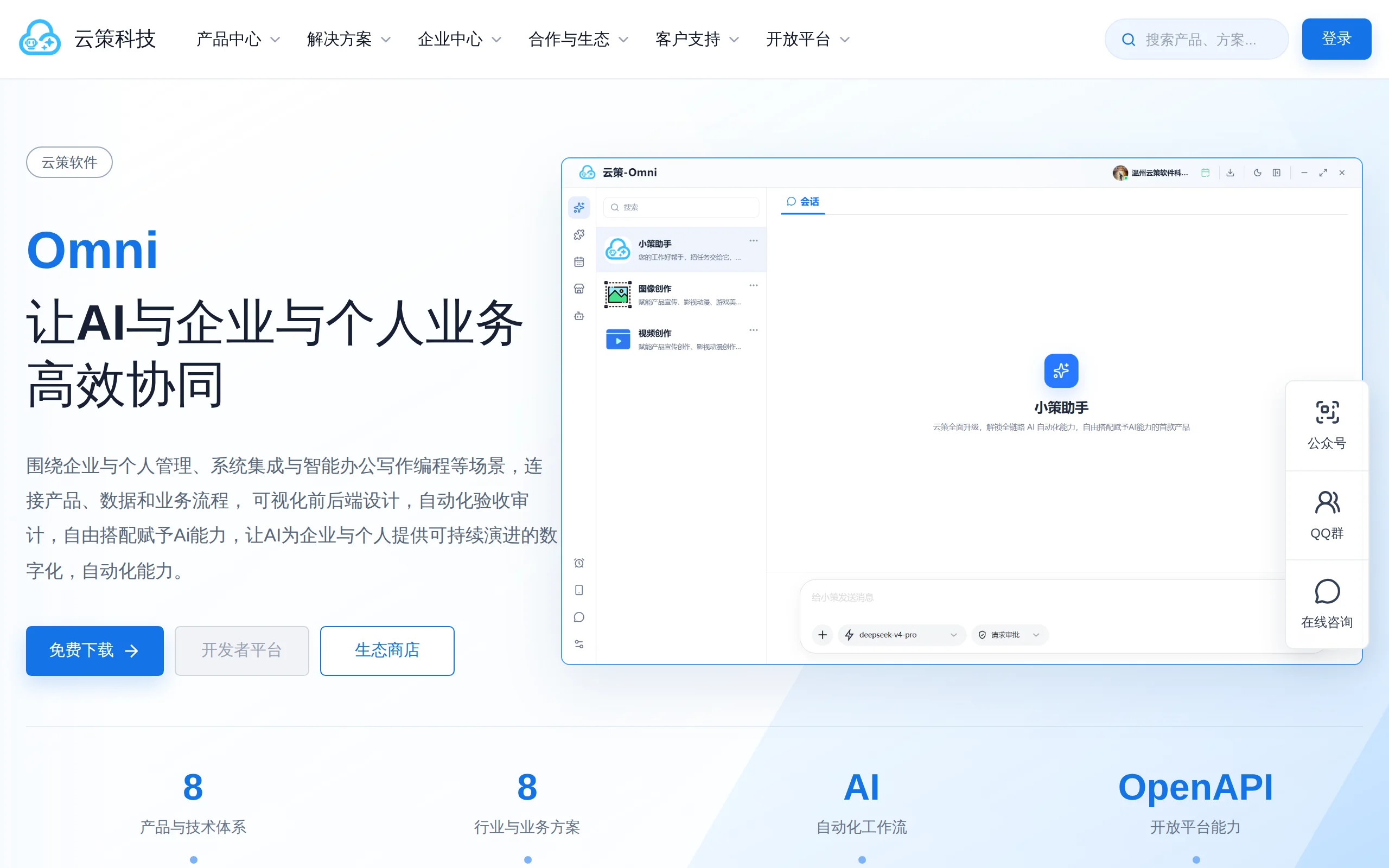
Yuncel Omni is a cross-platform desktop AI work platform, and the first internet product to emphasize "customizable AI capabilities." Through a loosely coupled architecture combining "models + skills ...
1. What is Yuncel Omni
Yuncel Omni is a cross-platform desktop AI work platform, and the first internet product to emphasize "customizable AI capabilities." Through a loosely coupled architecture combining "models + skills + plugins + virtual runtime environments," the platform enables AI to perform practical tasks such as project development, image and video creation, data manipulation, remote management, and automated verification within the scope of user authorization. Unlike traditional single-point AI tools, Yuncel Omni integrates model access, task understanding, deterministic execution, and security isolation into a unified workspace, emphasizing on-demand assembly and controlled permissions of AI capabilities.
Technical Positioning and Domain: Yuncel Omni belongs to the intelligent agent (Agent) work platform category, specifically focusing on localized AI task execution and automation on the desktop. It differs from cloud-based SaaS AI assistants by placing the core runtime environment on the user's local machine. This approach preserves the understanding and planning capabilities of large models while granting AI the ability to interact with local files, development environments, and even remote servers through a plugin mechanism, forming a complete loop of "thinking, acting, and verifying."
Development Background: Yuncel Omni was developed by the Yuncel Technology team and is presented as a commercial, closed-source desktop application. From its architectural design, it is evident that the team has deep experience in AI engineering and developer tools. They have chosen to enter the market with a combination of "skill workbench + plugin ecosystem + virtual environment," aiming to address the common issue of current AI assistants being "talk-only" and difficult to integrate into real workflows. The product is positioned for individual developers, content creators, and small team operations, emphasizing both out-of-the-box usability and security control.
Core Value: The core problem that Yuncel Omni addresses is the gap between general-purpose AI assistants and actual productivity tools. While general chatbots can generate code snippets or suggestions, they struggle to continuously complete coding, compiling, testing, and verification within authorized directories; they can generate images but lack the ability to manage assets in bulk or deliver them effectively. Yuncel Omni closes this gap by encapsulating skills into workflows, providing executable capabilities through plugins, and isolating runtime dependencies using virtual environments. This transforms AI from a "suggester" into an "executor" and ensures output quality through a visual verification mechanism, thereby covering the complete chain from task assignment to result delivery.
2. Key Features
Model Ark: Unifies access and management of text, image, and video models from multiple vendors, supporting mainstream protocols such as OpenAI Chat Completions, OpenAI Responses, and Anthropic Messages. Users can customize service addresses, model names, API Keys, request headers, and generation parameters. Keys are stored locally only, and the platform does not resell or participate in billing, enabling true model freedom and integration.
Skill Workbench: Skills such as XiaoCe Assistant, image creation, and video creation encapsulate complete AI workflows, capable of understanding user tasks and autonomously organizing execution processes. Skills are decoupled from plugins—skills handle the planning of "what to do" and "how to do it," while plugins handle the execution. Both can be independently installed and upgraded, and users can initiate separate sessions as needed, flexibly combining different capabilities.
Plugin Ecosystem: Plugins are executable units of capability, covering areas such as development, creation, and automation. Plugins must go through a four-step process—installation, registration, activation, and authorization verification—before being called by skills, ensuring that every external capability runs only with the user's explicit authorization. Plugins are installed in isolated virtual environments, preventing system contamination, and are loaded on demand and activated as needed.
Virtual Runtime Environment: The runtime environment is installed in isolated virtual directories in the form of plugins, without modifying the system PATH or leaving background processes when not in use. Users do not need to manually configure dependencies such as Python or Node.js; even beginners can set up a fully functional AI workspace with one click, fundamentally avoiding issues of environment conflicts and system contamination.
Local Project Development and Visual Acceptance: AI completes the full development process of reading, writing, compiling, and testing code within the authorized directory, and visual acceptance is conducted using DOM snapshots, diagnostic information, and actual screenshots. Frontend projects can be interactively previewed in built-in sub-windows, allowing users to directly see rendering results and avoid blind spots where the code is correct but the interface is flawed.
Desktop Workspace: Provides complete access points for skills, plugins, stores, and scheduled tasks, supporting desktop-level capabilities such as dual-interface mode, window docking, boot-up auto-start, background operations, task reminders, and theme switching. The product is designed for long-term usage scenarios, not just one-time conversation tools.
Data Security and Local Storage: Except for account login, all user data is stored locally and not uploaded to the platform server. Model keys, project files, and generation results are all saved on the user's device, combined with a four-level authorization verification mechanism, ensuring both functional openness and data sovereignty.
MCP External Connectivity: Includes a built-in local MCP service that organizes authorized capabilities into a tool directory accessible by AI, supporting controlled external connections. Users can generate temporary credentials to grant external tools access to specific capabilities, which automatically expire after a set period, providing a secure channel for cross-application integration.
3. Application Scenarios
Software Development and Testing: AI completes scaffolding setup, dependency installation, coding, compilation, and unit testing within authorized project directories. It performs visual verification through built-in sub-windows, covering the entire "development—testing—acceptance" workflow. Ideal for individual developers to quickly set up prototype projects or small teams handling repetitive coding tasks.
Frontend Page Creation and Interactive Acceptance: From page generation to DOM snapshots, element inspection, responsive switching, and layout auditing, AI can directly view the actual rendering effects and fix visual issues. Frontend engineers can delegate page generation and visual optimization to AI, allowing them to focus on architecture and interactive logic design.
AI Image and Video Creation: AI can complete text-to-image generation, reference image creation, text-to-video generation, and editing in one stop. Generated results are uniformly managed within the session. Content creators can batch produce materials and use scheduled tasks to automatically execute repetitive generation workflows, improving production efficiency.
Remote Server and Database Management: Combined with remote management and automated acceptance capabilities, AI can assist in performing operational tasks, processing data, and checking service status. Individual website administrators and small teams can delegate routine inspections, log analysis, and data organization tasks to AI for orchestration and execution, reducing the need for manual operational effort.
Game Development and Automation of Repetitive Tasks: AI can be used to orchestrate and execute repetitive tasks such as game automation development, data retrieval and organization, and scheduled tasks. Users only need to define the goals and boundaries. For game MOD developers and automation script writers, this provides a complete channel from planning to execution.
4. How to Use
Download and Installation: Visit the cloudce Omni official website at https://www.yuncehub.com/ to download the corresponding client (supports Windows, macOS, and other mainstream desktop systems). After completing the installation, run the application and log in with your account. The installation package includes a built-in virtual runtime environment management component, so no need to pre-install Python or Node.js.
Model Integration: Select the vendor and model type in "Model Ark," and enter parameters such as API Key, service address, and model name to uniformly integrate the required AI models. Supports mainstream protocols like OpenAI and Anthropic. Users can configure multiple models simultaneously and switch between different skills as needed, with keys stored only locally.
Install Skills: Install skills such as "Little C Assistant," "Image Creation," and "Video Creation" on the skill workbench. Skills are pre-packaged AI workflow templates. Once installed, you can start independent sessions. Users can choose skills as needed and can also install additional professional skills later.
Install Plugins: Install the required executable plugins from the plugin ecosystem (e.g., code compilation, browser control, image processing). Plugins are installed on-demand into the selected virtual environment and do not interfere with the system directory. After installation, you need to complete the registration and activation process in the settings.
Authorized Directory Binding: Bind the AI's working scope to a local project directory, clearly defining the boundaries for file reading and writing. The AI can only perform file operations within the authorized directory, and external directories are inaccessible by default. This mechanism prevents unauthorized access.
Task Assignment and Execution: Enter a task description in the skill interface, and Little C will automatically combine the capabilities of the installed plugins to complete development, creation, and data processing tasks. Users can observe the execution progress in real time and interrupt or adjust instructions when necessary.
Visual Acceptance: Preview the interaction in the built-in sub-window of Omni frontend projects. Combine DOM snapshots, screenshots, and diagnostic information for visual acceptance. The AI fixes visual issues based on actual rendering results, rather than relying solely on code logic.
External Connection Expansion (Optional): Use the built-in MCP service to expose authorized capabilities to external tools. Generate temporary credentials to enable controlled connections. External tools can invoke AI capabilities within the validity period of the credentials, and the credentials automatically expire after that period, making it suitable for cross-application integration scenarios.
5. Pros and Cons Analysis
| Pros |
|---|
| Zero Environmental Pollution: The runtime environment is isolated and installed in a virtual directory as a plugin, without modifying the system PATH. It runs no background processes when not in use, solving the long-standing issue of AI tools being "installed but not cleanly uninstallable." |
| Model Freedom of Access: Model Ark is compatible with mainstream protocols such as OpenAI and Anthropic. Users can select their preferred model and customize parameters. The platform does not act as a reseller or participate in billing, avoiding vendor lock-in. |
| Modular Capabilities: The "model + skill + plugin" loosely coupled architecture allows each of the three components to be independently installed and upgraded. Users can assemble the appropriate capability combinations based on their needs, enabling flexible expansion. |
| Visual Acceptance Loop: Built-in sub-window preview combined with DOM snapshots, screenshots, and diagnostic information can identify visual and interactive issues that pure code reviews might miss, significantly improving delivery quality. |
| Controlled Permissions and Security: File operations are strictly limited to authorized directories. Plugins require a four-step verification process, and MCP connections support temporary credentials. The security design is relatively comprehensive compared to similar tools. |
6. Comparative Analysis with Similar Tools
| Comparison Dimension | Yunce Omni | OpenClaw | ChatGPT Desktop |
|---|---|---|---|
| Product Nature | Commercial closed-source desktop software, an out-of-the-box AI work platform | Open-source personal AI assistant runtime (MIT License), 370,000+ GitHub stars as of 2026 | Commercial closed-source desktop client, conversational AI assistant |
| Product Form | Cross-platform desktop client with a graphical workspace | Local Gateway + command-line configuration, relies on CLI and .env files | Desktop chat window, focused on conversation and light tasks |
| Interaction Entry Points | Skill workbench, desktop sub-windows, project binding | 50+ communication channels (WeChat, Telegram, WhatsApp, Slack, etc.) | Desktop chat window, supports voice input |
| Model Integration | Unified management via Model Ark, supports OpenAI and Anthropic protocols, keys stored locally | Supports Claude, GPT, Ollama local models, and any OpenAI-compatible endpoint | Limited to official OpenAI models, no customization allowed |
| Skill/Plugin System | Three-tier architecture of skills + plugins + virtual runtime environment, plugins are isolated and installable | Skills ecosystem (ClawHub community with 40,000+ skills) + multi-Agent routing division | No plugin system, only built-in features supported |
| Development Environment Management | Virtual environment plugin-based one-click installation, no background processes | Requires self-prepared Node.js environment, supports Docker/Nix/VPS deployment | No local development environment involved |
| Project Acceptance Capability | Built-in sub-window preview, visual acceptance with DOM snapshots + screenshots + diagnostics | Supports Playwright browser control, but lacks a fully visual acceptance loop | Does not support local project acceptance |
| Data Security | All data is local except login, with four-level plugin authorization verification | Fully self-hosted, state, memory, and credentials stored entirely on user hardware | Conversation data is uploaded to OpenAI servers |
| External Connectivity | Built-in local MCP service, temporary credentials are controlled and open | Multi-channel gateway is inherently external, unknown messages require pairing codes for confirmation | No support for external MCP connectivity |
Selection Recommendations: For users who prioritize graphical experience and need AI to directly operate local projects and complete visual acceptance, Yunce Omni is a more suitable choice — its virtual environment and authorization directory mechanism allow non-technical users to safely enable AI to perform real tasks. For developers who prefer full control, are familiar with command-line interfaces, and are willing to configure environments themselves, OpenClaw's open-source ecosystem and integrated communication channel capabilities are more appealing, though they require more configuration time. If the use case is limited to daily conversations, writing assistance, or light information queries, the official desktop client is sufficient. If cloud-based automated task execution is desired without local file operations, cloud-based AI agent services can be considered. In short, Yunce Omni's differentiating value lies in the combination of "local execution + visual acceptance + controlled permissions," which precisely addresses a clear need in the developer toolchain that previously lacked an integrated solution.
7. Editor's Summary
CloudCite Omni's exploration in the AI work platform domain carries significant technological innovation. Its four-tier architecture — "model + skill + plugin + virtual runtime environment" — redefines the way AI capabilities are assembled: models handle reasoning and planning, skills encapsulate workflows, plugins provide deterministic execution, and virtual environments isolate runtime dependencies. Each layer is loosely coupled and can be independently upgraded. This architectural design addresses a core contradiction in current AI tool implementation: the stronger the large model's capabilities, the more precise execution boundaries and controllable permission scopes are required. The introduction of a four-tier authorization verification mechanism and a local MCP service indicates that the team has a systematic approach to defining AI security boundaries, rather than treating security as an afterthought.
In terms of practical value, CloudCite Omni's visual verification loop is a standout differentiating feature among similar products. Frontend projects can be rendered in built-in sub-windows, combined with DOM snapshots, screenshots, and diagnostic information for verification, effectively bridging the gap between "correct code" and "correct interface." For developers, content creators, and operations personnel, this tool transforms AI from a "suggestor" into an "executor," truly covering the complete workflow from task issuance, execution, to verification.
In terms of target users, CloudCite Omni is suitable for three categories of users: first, non-technical users who are unfamiliar with environment configuration but wish for AI to perform actual tasks — the one-click installation of the virtual environment lowers the usage barrier. Second, developers who need AI assistance with coding and frontend verification — the authorization directory mechanism ensures clear boundaries for AI's code operations. Third, content creators and website administrators, whose image and video creation capabilities and remote management features cover their daily high-frequency needs.
In terms of future development potential, the richness of CloudCite Omni's plugin ecosystem and skill market will determine its upper limits. Currently, the number of available skills still lags behind open-source communities, but its closed ecosystem provides higher stability and security guarantees. As the MCP standard becomes more widespread and virtual environment technology matures, AI work platforms that prioritize local execution are likely to gradually expand their market share in data-sensitive scenarios. Overall, CloudCite Omni is a clearly positioned, well-architected AI work platform, and is worth the attention and trial of users with actual needs for AI execution capabilities.
8. FAQ
Q: Which operating systems does Yunce Omni support?
A: Yunce Omni is a cross-platform desktop client that supports mainstream desktop systems such as Windows and macOS. Specific version requirements are subject to the official website's published information. The support status for Linux will be announced by the official team at a later date.
Q: Do I need to prepare my own model API Key to use Yunce Omni?
A: Yes. The model ark of Yunce Omni is only responsible for unified access management. Users must obtain API Keys themselves from model providers such as OpenAI and Anthropic, and input them into the model ark. The platform does not purchase model services on behalf of users or participate in billing. Keys are only stored locally on the user's machine.
Q: Will Yunce Omni upload my project code or data to the server?
A: No. Except for account login, all user data is stored locally and not uploaded to the platform's server. AI operations are restricted to the authorized directory, and model API calls only transmit task-related input and output content. The project files themselves will not leave the local machine.
Q: Will plugin installation affect the system environment?
A: No. Plugins are installed in isolated virtual directories in a virtual environment format, without modifying the system PATH. When not in use, there are no background processes. This design prevents traditional software installation from polluting the system environment, and plugins can be completely removed after uninstallation.
Q: What is the core difference between Yunce Omni and OpenClaw?
A: Yunce Omni is a commercial closed-source desktop application that provides a graphical workspace and a visual acceptance loop, making it ideal for non-technical users who want to use it out-of-the-box. OpenClaw is an open-source project that uses command-line configuration and supports over 50 communication channels, making it suitable for developers who enjoy DIY and are familiar with CLI. The former emphasizes security and ease of use, while the latter emphasizes openness and flexibility.
Q: Can AI perform file operations outside the authorized directory?
A: No. The authorized directory mechanism in Yunce Omni strictly limits the AI's file read and write boundaries. File operations outside the directory are by default prohibited. Plugins must go through a four-step process—installation, registration, activation, and authorization verification—before they can be called. This mechanism prevents unauthorized access.
Q: What is the purpose of the external connection for MCP?
A: The built-in local MCP service organizes authorized capabilities into a tool directory that AI can call. Users can generate temporary credentials to grant external tools access to specific capabilities. These credentials automatically expire, making them suitable for cross-application integration scenarios while maintaining both functional openness and security control.
9. Project Links
- Yunce Omni Official Website (Download Entry): https://www.yuncehub.com/ (The official website serves as the official entry point for product releases, client downloads, and documentation.)
Related

GO-3 Preview: In-depth Evaluation of AgiBot's Embodied AI Model with Full-Chain Scaling Learning
GO-3 Preview is an embodied AI model launched by AgiBot, with its core feature being the realization of a full-chain scaling learning loop from pre-training, post-training to deployment. The model emp...
WorldSonus: In-Depth Review of the Real-Time Streaming Voiceover Framework Open-Sourced by HKUST and Shanghai Jiao Tong University
WorldSonus is a streaming voiceover framework open-sourced by the Hong Kong University of Science and Technology in collaboration with Noiz AI, MetaX, and Shanghai Jiao Tong University. Its core posit...
Voyager – Open-Source Desktop Creative Agent Covering the Full Production Workflow
Voyager is an open-source desktop creative Agent developed by Nullframe, designed to directly embed AI capabilities into creators' existing professional software workflows through natural language int...
In-Depth Review of GPT-6.1 Terra – OpenAI's High-Efficiency Execution Large Model
GPT-6.1 Terra is a high-efficiency execution large model introduced by OpenAI, designed for office automation and high-frequency Agent task scenarios. It emphasizes enhanced visual understanding, comp...
© All Rights Reserved. Some content on this site is partially generated by AI with human review.