
PoseWear – An Open-Source AI Virtual Try-On Tool, Ready to Use Out of the Box
Executive Summary:
PoseWear (YiZi) is an open-source AI virtual try-on tool that innovatively integrates three types of materials—human portrait images, clothing images, and pose reference images—onto a single platform,...
1. What is PoseWear
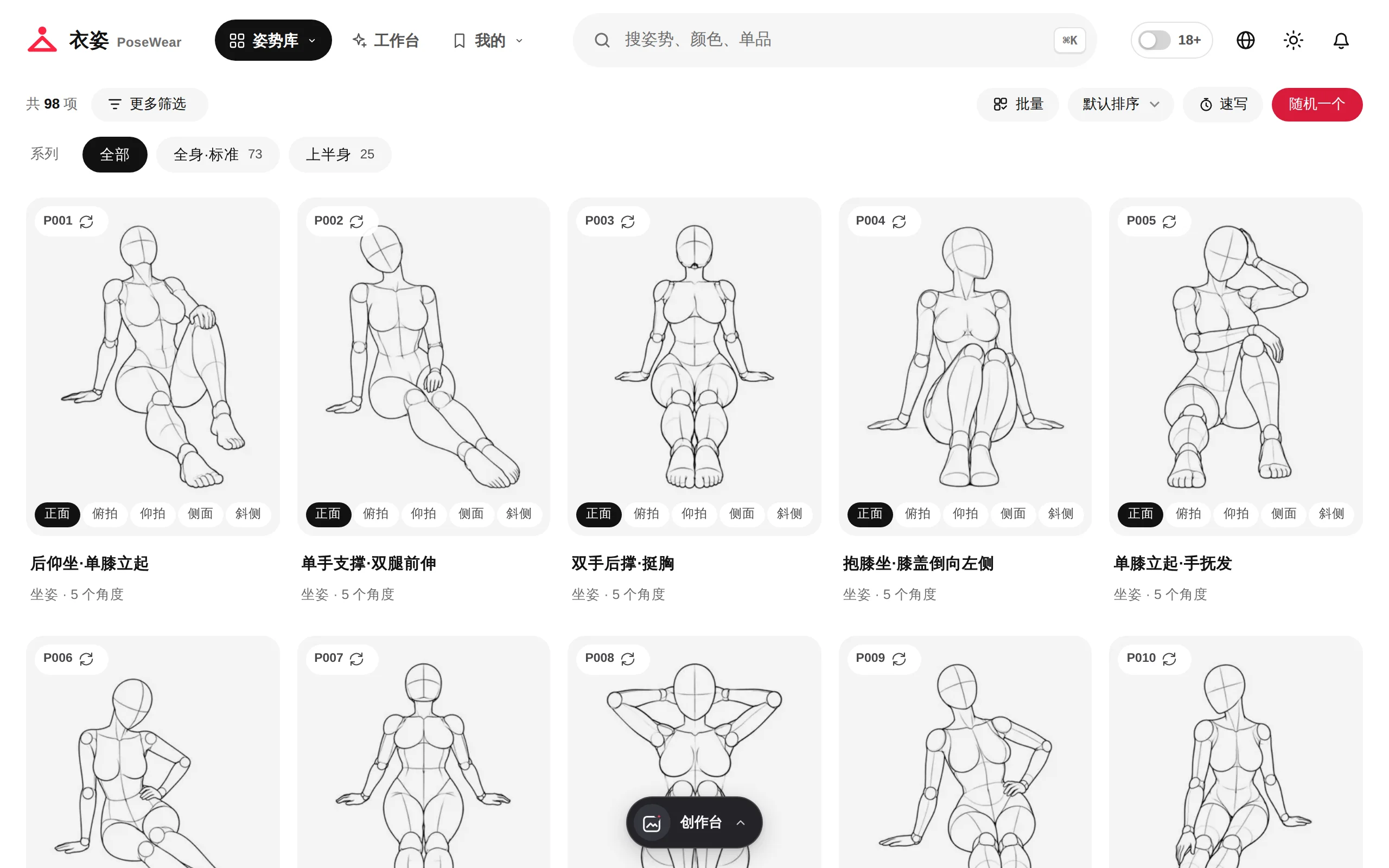
PoseWear (YiZi) is an open-source AI virtual try-on tool that innovatively integrates three types of materials—human portrait images, clothing images, and pose reference images—onto a single platform, allowing users to generate realistic virtual try-on images with just one click. The tool employs a purely static site architecture without a backend database, storing all user API keys, favorite materials, and generation records locally in the browser, offering notable privacy-friendly features. The project is fully open-sourced under the MIT license and supports deployment on static hosting platforms such as Cloudflare Pages. It also integrates ready-to-use material resources, including a pose library (with depth maps), clothing library, and portrait library, making it especially suitable for e-commerce sellers to conduct low-cost product testing and mass production of model images, effectively reducing reliance on physical photography.
Technical Positioning and Field: PoseWear falls under the domain of AI image generation and virtual try-on applications, primarily addressing the efficiency and cost challenges faced by e-commerce sellers and content creators during the production of model try-on images. It is not a self-developed image generation model but instead functions as an aggregation and scheduling layer, connecting to various image generation models (such as OpenAI, Gemini, and Doupai Seedream) via an OpenAI-compatible interface. It transforms the three essential elements provided by users into realistic try-on results. Its unique positioning among similar tools lies in being an open-source solution that is "purely static, zero backend, and fully integrated with material resources."
Development Background: PoseWear was created and maintained by developer atuizz, and the project is hosted on GitHub. The motivation behind its development stemmed from the fragmented issues faced by e-commerce sellers during product testing and image generation, such as high costs for real photography, scattered materials across multiple platforms, and the hassle of switching between different tools. By consolidating the three types of material libraries—portraits, clothing, and poses—alongside the generation tool into one platform and using a purely frontend architecture, the developer achieved privacy protection while significantly lowering the usage and deployment barriers for users.
Core Value: This tool addresses three major pain points in the virtual try-on workflow for clothing merchants and creators: first, privacy security—without a backend database, user images and API keys remain on the local device, eliminating the risk of data leakage; second, cost control—users bring their own API keys and pay on a per-use basis, with costs directly settled with the service provider, avoiding markups by intermediaries; third, efficiency improvement—by integrating material libraries and generation tools into one platform, and by providing an e-commerce-oriented pose library, the production of model images that previously took several days is now compressed into minutes.
2. Key Features
AI Virtual Try-On Generation: This is the core feature of PoseWear. Users upload portrait photos, clothing images, and pose reference images. The system fuses the semantic information of the three types of inputs through an integrated image generation model, outputting a realistic upper-body rendering that aligns with the subject's pose and body type. The generated images retain the garment's structure and details while adapting to the body shape of the selected pose.
Triple-in-One Generation Workspace: PoseWear innovatively integrates portrait, clothing, and pose materials into a single interface. Users no longer need to switch between multiple tools or tabs to upload assets. This unified interaction design significantly simplifies the try-on generation workflow, compressing the operation path from multiple steps into a single-page process.
Built-in Asset Library and Depth Map Support: The project includes ready-to-use reference images such as a pose library (with depth maps), clothing library, and portrait library. Depth maps provide spatial geometric information to the generation model, enhancing the accuracy of pose reconstruction. Users can directly select pre-existing assets, eliminating the need to gather reference images themselves and reducing preparation time.
Flexible Multi-Model Integration: Supports integration with OpenAI, Gemini, Doupai Seedream, and any custom OpenAI-compatible API. Users can freely switch between underlying generation models based on image quality, cost budget, and style preference. Authentication is completed by entering their own API Key in the settings, and the key is stored only locally in the user's browser.
Privacy-Friendly Architecture: As a pure static site, PoseWear has no backend database. All user API keys, favorite assets, and generation records are stored locally in the browser (e.g., localStorage/IndexedDB), and data never leaves the device. This design eliminates from the architecture level the risks of data retention and leakage on the service provider's side.
Favorite and History Management: Users can save preferred poses, clothing items, and portraits. The system automatically saves each generation record. Users can review historical generation results anytime, enabling side-by-side comparisons and reuse, which is especially useful in bulk image generation scenarios to maintain style consistency or select the best rendering.
Open Source and Customizable Deployment: Fully open source under the MIT license, supporting deployment on free static hosting platforms such as Cloudflare Pages. Users can add custom assets (e.g., Hanfu, ancient costumes, etc.) to the library themselves, freely expanding the asset boundaries and enabling deep customization for specific business scenarios.
3. Application Scenarios
E-commerce Product Testing and Image Generation: Apparel sellers can quickly generate bulk images of models wearing different styles without the need for real-life photoshoots with models. These images are used for new product testing and listing on e-commerce platforms. Combined with an e-commerce-oriented pose library, multiple sets of visuals compliant with platform standards can be produced in a short time, significantly reducing the time and trial costs associated with product testing.
New Product Visual Expansion: For new product launches, operations teams can leverage PoseWear to rapidly generate multiple sets of main images and product detail page content in various poses and styles (such as business, casual, street style). These visuals can be paired with different backgrounds and scene settings to enrich the visual hierarchy of the product detail page and shorten the listing cycle.
Outfit Content Creation: Fashion bloggers and content creators can generate bulk图文 content showcasing themselves wearing various outfits. By uploading a personal portrait and selecting multiple outfits from the clothing library with different poses, they can produce a series of outfit display content, significantly reducing the costs of studio photography and venue rentals while increasing content update frequency.
Hanfu/Period Costume Visual Production: By expanding the custom visual library with specialized costume images such as Hanfu and xianxia (immortal fantasy) attire, PoseWear can fulfill the image generation needs for niche vertical categories. This scenario requires a high degree of visual library extensibility, and the open-source nature of this project makes it a flexible and customizable solution.
Personal Virtual Try-On for Purchase Decision-Making: Regular consumers can upload their own photos and desired clothing images to preview how the clothes would look on them before purchasing, aiding in the decision-making process. This scenario has practical value in reducing returns and exchanges caused by improper sizing or fit, especially for high-value online clothing purchases.
4. How to Use
The usage process of PoseWear is designed to be straightforward, requiring only a few steps from opening the website to generating the final visualized image. Here are the specific steps:
Open the Website: Directly visit the PoseWear official website or the site address after self-deployment. This tool is a pure static webpage, requiring no account registration or login. It can be used immediately upon opening, without the need to install any client software or dependencies.
Configure API Key: Click on the settings entry on the page and enter your image generation model API Key in the configuration panel (e.g., OpenAI, Gemini, or Seedream from Doupao). The key is only stored locally in the browser and will not be uploaded to any server. If using a custom OpenAI-compatible interface, you must also enter the corresponding API base URL (Base URL).
Select a Portrait: Upload a front or half-body photo that you have the right to use, or choose a face model image directly from the built-in portrait library as the base for generation. It is recommended to prioritize portraits with even lighting and simple backgrounds, which can help improve the generation results.
Select Clothing: Upload your own flat lay or hanging shot product image, or choose pre-existing materials from the clothing library. The clarity and completeness of the clothing image directly affect the accuracy of the final visualization. It is recommended to use product images with white or solid color backgrounds.
Select Pose: Choose an appropriate action reference image from the pose library. For e-commerce image generation scenarios, it is recommended to use a dedicated e-commerce pose library to achieve poses that better conform to product display standards. Depth map materials can be used to enhance the model's understanding of spatial posture.
Set Parameters: In the generation panel, select the desired generation style (e.g., realistic, studio shot, street style), aspect ratio (e.g., 1:1, 3:4, 4:3), and the number of images to generate in one session. After setting the parameters, you can preview a summary of your configuration before generation.
Generate Images: Click the generate button and wait for the AI to output the visualized image based on the three elements: portrait, clothing, and pose. The generation time depends on the response speed and queue load of the connected model, typically ranging from several seconds to several minutes.
View and Download: After generation is complete, compare multiple results in the generation history area and select the image you are satisfied with for direct download and saving. All generation records are stored locally in the browser. Closing the page does not delete the data, which can be accessed and reused at any time.
5. Pros and Cons Analysis
| Pros |
|---|
| Privacy-friendly architecture: Utilizes a pure static site design with no backend database. API keys and generation records are stored only locally in the browser, and user images never leave the device, thereby eliminating data leakage risks at the architectural level. |
| Zero-threshold out-of-the-box usability: No registration, no deployment, no dependency installation required. Simply open the browser to start using it, making it extremely user-friendly for non-technical users with nearly zero learning curve. |
| Integrated material resources in one place: Built-in pose library (including depth maps), clothing library, and human figure library. Combines material collection and generation tools into a single platform, directly addressing the fragmented issue of materials scattered across multiple sites, significantly improving generation efficiency. |
| Highly scalable and multi-model compatible: Supports integration with OpenAI, Gemini, DouPao Seedream, and any OpenAI-compatible APIs. Allows for custom material libraries, and with the MIT open-source license, enables free modification and deployment, offering strong adaptability. |
| Flexible and controllable cost: Users bring their own API keys and pay on a per-use basis, with costs directly settled with the service provider. There is no platform markup or subscription lock-in, making it suitable for a wide range of usage frequencies, from occasional needs to bulk production. |
6. Comparative Analysis with Similar Tools
The AI virtual try-on赛道 where PoseWear is positioned already has several representative products. This section compares and analyzes PoseWear with Kolors Virtual Try-On (Ketuo), Krea AI's virtual try-on workflow, and the Hugging Face virtual try-on Demo.
| Comparison Dimension | PoseWear | Kolors Virtual Try-On (Ketuo) | Krea AI Virtual Try-On Workflow |
|---|---|---|---|
| Open Source Status | Fully open-sourced under the MIT license, supports self-deployment and modification, with complete code openness | Not open-sourced; model weights and code are not publicly available, only online services are provided | Partially open-sourced; some workflow templates are public, but core models are closed-source |
| Product Form | Pure static website, no backend, can be deployed to Cloudflare Pages | Online experience on HuggingFace/ModelScope + KeLing platform | Workflow templates within an online creative platform, requires login |
| Usage Cost | Pay-as-you-go with built-in API Key, no platform surcharge | Free online trial, but often unavailable during peak hours due to high user volume | Requires a Krea membership or platform credits |
| Input Method | Unified input of human figure + clothing + pose map, with full control over pose | Human image + clothing image, pose follows original photo and cannot be specified separately | Human image + clothing image, with support for additional conditional inputs |
| Asset Library | Built-in complete asset library for poses, clothing, and human figures, supports custom expansion | No independent asset library, requires users to provide their own image assets | No built-in asset library, relies on user-uploaded content |
| Generation Quality | Depends on the connected model (Gemini, Doupao, OpenAI, etc.), with significant variability | Dedicated try-on model, maintains good SKU details and high fitting accuracy | Relies on Krea platform models, with strong style generation capabilities |
| Privacy Protection | All data is stored locally in the browser, never leaving the device, offering the strongest privacy protection | Images must be uploaded to the Kuaishou server, posing a risk of data retention by the platform | Images are uploaded to the Krea server for processing |
Selection Recommendations: If the user is a clothing e-commerce seller or an independent creator with high demands for asset integration efficiency and cost control, and already has an image generation API Key, PoseWear is a practical choice that balances privacy and scalability. Its built-in pose library and local storage mechanism offer unique efficiency advantages in batch image generation scenarios, making it suitable as a primary daily tool. If the user requires extremely high fidelity in clothing details and can accept waiting in line and data retention by the platform, Kolors Virtual Try-On's dedicated try-on model performs better in terms of fitting accuracy, making it more suitable for brand merchants with strict detail requirements. For creators who prefer visual workflows and prioritize stylized outputs over realistic recreation, Krea AI offers a more extensive parameter adjustment space. Meanwhile, the academic model demo on Hugging Face provides developers with a low-cost entry point to test the latest try-on algorithms.
7. Editor's Summary
PoseWear has opted for a "lightweight aggregator" technical approach rather than a "heavy model" in its AI virtual try-on tool, a choice that reflects a sharp understanding of real user pain points. By integrating three types of materials—human figures, clothing, and poses—into a single-page workspace, and combining it with an in-built material library and local storage mechanism, it effectively redefines the operational workflow of virtual try-on—from material collection, tool switching, model invocation, to result management. Work that was previously spread across multiple steps is now condensed and completed within a single interface. This workflow-centric architectural design carves out a pragmatic, differentiated path in a competitive landscape that otherwise prioritizes extreme performance.
In terms of practical value, PoseWear offers significant benefits to e-commerce sellers and content creators by reducing the marginal cost of generating try-on images to nearly zero: no need to bear the costs of models or photography studios, and a pay-per-use model avoids the sunk costs associated with subscription-based services. Its privacy-friendly, purely static architecture stands out among similar products that rely on cloud services—local storage ensures that users' model faces and product images are not stored as assets in the service provider's database, which is a crucial advantage for businesses that prioritize commercial confidentiality.
The target user base for this tool is clearly defined: e-commerce operators, independent designers, fashion bloggers, and virtual try-on enthusiasts who have a certain level of technical understanding and already possess image generation API keys. While the generation quality is limited by the capabilities of the connected API, the multi-model compatibility design provides users with the flexibility to choose the best model based on their needs—selecting specialized models for detail accuracy, or general-purpose models for stylistic variety.
The project is currently in its early open-source phase, with room for improvement in the scale of the material library and the completeness of documentation. As community contributions and custom materials accumulate, its ecosystem value is expected to gradually emerge. For individual users and small-to-medium-sized businesses exploring low-cost virtual try-on solutions, PoseWear provides a reliable starting point that balances privacy, cost, and efficiency.
8. FAQ
Q: Is PoseWear completely free?
A: The software itself is completely free and open source (MIT License), but generating images consumes API quotas from the connected image model. Users must apply for an API Key themselves from services such as OpenAI, Gemini, or Seedream, and pay generation fees according to each provider's pricing standards.
Q: Are the generated images stored on the server?
A: No. PoseWear is a pure static site with no backend database. All generation records, saved materials, and API keys are stored in the user's browser local storage (such as localStorage). Data remains after closing the page, but clearing browser cache will delete these data. It is recommended to regularly download and save important generation results.
Q: Why is the quality of the generated images unstable?
A: This is because PoseWear uses third-party image generation APIs, and the final quality depends on the capabilities and parameter settings of the connected model. If you are not satisfied with the results, you can try: switching to a more powerful underlying model (e.g., switching from an open-source model to a high-precision version of Gemini or Seedream), optimizing the lighting and background of the portrait photo, using clear white-background clothing images, and selecting e-commerce poses that conform to product display standards.
Q: Can the generated images be used for commercial purposes?
A: Yes. PoseWear is open source under the MIT License and does not restrict the usage of generated content. However, you should note: ① whether the terms of service of the API provider you are using allow commercial use of generated content (policies vary across platforms); ② ensure that you have the right to use the portrait you uploaded; ③ if the clothing image involves brand design, confirm the copyright ownership.
Q: Can it connect to large model APIs in China?
A: Yes. PoseWear supports OpenAI-compatible interfaces, and any service provider offering this protocol can be connected, including mainstream platforms in China such as Seedream (by Volcano Engine) and Tongyi Wanxiang (by Alibaba Cloud). Simply enter the corresponding API Key and Base URL in the settings.
Q: How can I expand the custom material library?
A: The project is open source and supports modification. You can add your own pose images (with optional depth maps), clothing images, and portrait images to the code repository following the existing directory structure. Then, redeploy it to Cloudflare Pages or other static hosting platforms. For specific operation instructions, refer to the README in the GitHub repository.
9. Project Links
- Project Website (Online Experience): https://posewear.pages.dev/
- GitHub Repository: https://github.com/atuizz/posewear
Related

MatrixMedia Review: In-Depth Analysis of This Open Source Multi-Platform Video Distribution Tool
MatrixMedia is an open-source multi-platform video matrix publishing and bulk distribution tool. Its core value lies in helping self-media operators achieve an efficient workflow of "one-time preparat...
AI Open Source Project Weekly – Featured Projects: TV to Desktop, AI Dubbing, and More
VoiceStudio is a localized desktop tool focused on text-to-speech synthesis and audio processing, integrating voice generation, voice cloning, video dubbing, and speech transcription into a unified wo...
Orca Review: Orchestrate a Fleet of Coding Agents (stablyai)
If you use both Claude Code and Codex for different tasks and want them running in parallel in their own working directories, Orca is worth a look. This open-source orchestration tool from stablyai is...
baoyu-design – Open Source AI Design Tool, a Local Alternative to Claude Design
baoyu-design is an open-source project by Baoyu, which fully encapsulates the design engine from claude.ai into a portable Agent Skill. This enables over 70 local Agents, such as Cursor, Claude Code, ...
© All Rights Reserved. Some content on this site is partially generated by AI with human review.