
OmniEdu – Open-Source Educational Multimodal Model Series from Peking University, USTC, and Others
Executive Summary:
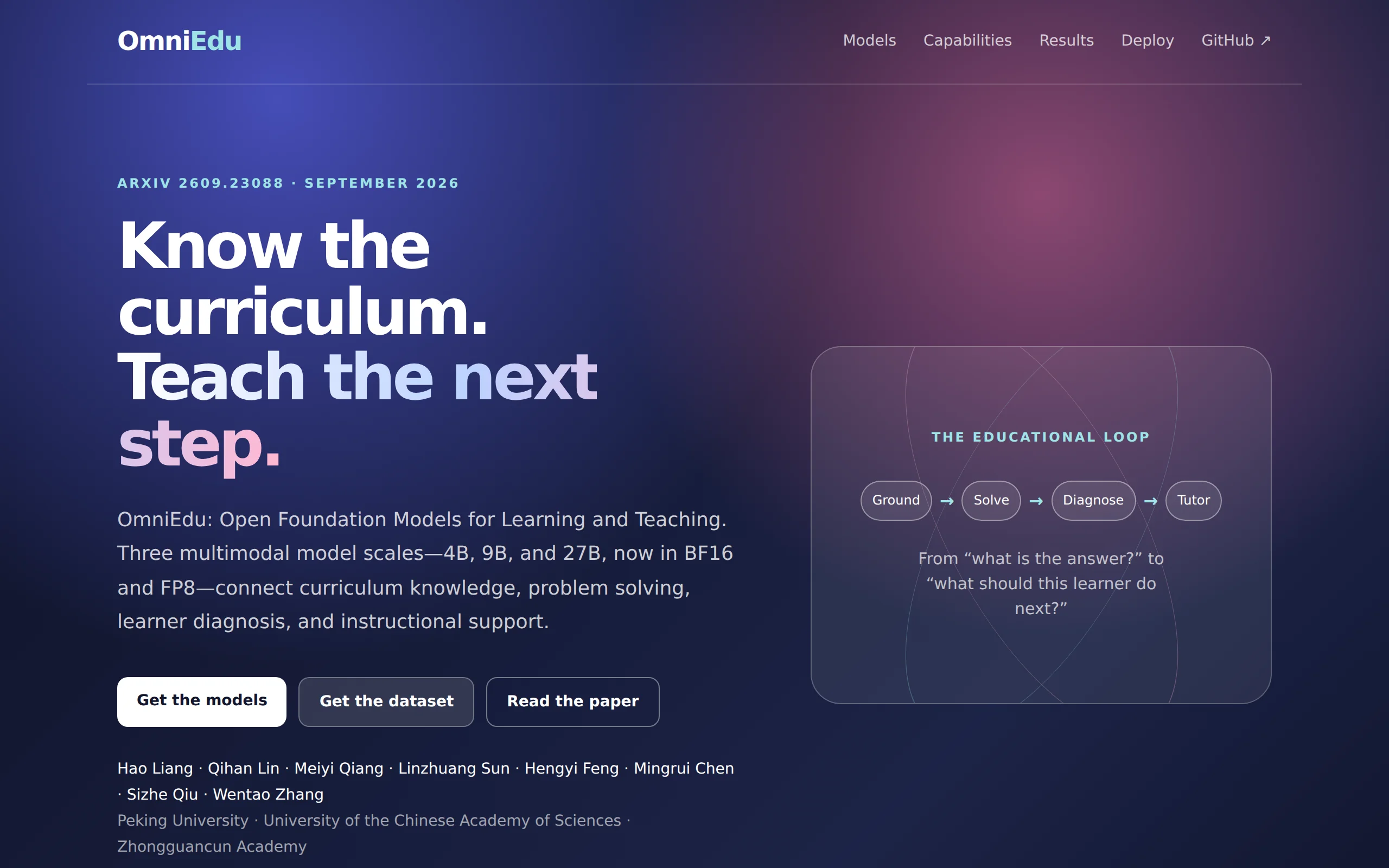
OmniEdu is an open-source educational multimodal model series jointly developed by the DCAI team at Peking University, along with the University of Science and Technology of China (USTC) and Zhongguan...
1. What is OmniEdu
OmniEdu is an open-source educational multimodal model series jointly developed by the DCAI team at Peking University, along with the University of Science and Technology of China (USTC) and Zhongguancun College. It offers three parameter scales: 27B, 9B, and 4B. This series of models is designed with teaching capabilities as its core objective, enabling it to solve subject-related problems, determine the position of knowledge points within a curriculum, diagnose student errors, and select appropriate teaching actions. The team carefully selected approximately 69,000 high-quality samples from around 1.34 million candidate data points for training, allowing the model to achieve state-of-the-art (SOTA) performance in multi-subject problem-solving, learning diagnosis, and tutoring tasks. The 4B small model can be deployed on regular servers, effectively reducing the hardware requirements for schools adopting AI teaching assistants.
Technical positioning and domain: OmniEdu belongs to the intersection of educational artificial intelligence and multimodal large models. Its unique positioning lies in covering the entire "learning-teaching" process in the K-12 stage—from solving subject problems and understanding course knowledge graphs, to diagnosing student errors and selecting teaching strategies—rather than merely providing answer-based Q&A. This direction remains relatively rare among existing open-source educational models.
Development background: This model was led by the DCAI team at Peking University, in collaboration with USTC and Zhongguancun College. The team has extensive experience in large model training and data engineering. The motivation for its development stems from the current lack of "teaching behavior capabilities" in educational models—models can solve problems, but they often fail to diagnose where students are stuck or how to guide thinking through questioning.
Core value: OmniEdu addresses the key challenge in upgrading educational AI from a "question-answering tool" to a "teaching assistant." Through a task-instruction-driven mechanism, the same model can flexibly switch behavior modes across different teaching scenarios such as problem-solving, diagnosis, and tutoring. Combined with a rigorous training data screening and decontamination process, it achieves leading performance on multiple educational evaluation benchmarks.
Technical features: The model uses 20 types of task system instructions to switch behaviors. Training data is categorized into four types of teaching capabilities and token budgets are allocated to ensure balanced proportions. Approximately 69,000 samples were retained from the 1.34 million candidates after semantic review, decontamination, and diversity filtering. It also supports multimodal input of text and images, while maintaining both inference efficiency and teaching effectiveness.
2. Key Features
Subject Problem-Solving Ability: Covers four major subject areas: mathematics, science, reading comprehension, and writing. The model not only provides the correct answer but also ensures that the explanation aligns with the question's conditions and the reasoning process, avoiding the common issue of "correct answer but incorrect process." This capability is based on dual verification of solution accuracy and reasoning consistency in the training data.
Curriculum Understanding and Knowledge Localization: The model can identify the relevant knowledge points, applicable grade level, difficulty rating, and prerequisite dependencies between knowledge points. It determines what foundational content students need to review before proceeding with further learning. This feature maps individual questions to a curriculum knowledge graph, supporting the development of personalized learning pathways.
Diagnostic Reasoning Ability: Unlike methods that guess students' mistakes based solely on the question, OmniEdu identifies specific error steps, analyzes comprehension gaps, and pinpoints missing knowledge points by examining the student's response process and incorrect answers. This functionality is especially effective for scenarios such as step-by-step mathematical calculations and logical misinterpretations in reading comprehension.
Teaching Action Selection: Based on diagnostic results and teaching objectives, the model selects an appropriate response strategy, including prompts, guided questioning, reviewing prerequisite concepts, directly pointing out errors, or providing full explanations. With the ability to switch between 20 different task instructions, the same model can assume various roles, ranging from strict problem-solving to Socratic-style tutoring.
Multimodal Input Support: The model supports mixed text and image inputs. Students can submit handwritten problem-solving steps, textbook screenshots, or geometric diagrams as images, and the model will perform joint text-image understanding before providing diagnostic and instructional feedback. This capability enhances the model's applicability in real-world teaching scenarios.
Support for Multi-Scale Models: Offers three parameter scales: 4B, 9B, and 27B, with additional FP8 quantized versions available. The FP8 versions reduce download size by 37%–44% compared to the original versions. The 4B model can be deployed on standard school servers, while the 27B model is designed for high-performance computing environments, meeting deployment needs under different budget and computational constraints.
Educational Evaluation Benchmark Support: The official toolkit includes 12 educational evaluation benchmarks, covering dimensions such as K-12 problem-solving, college entrance exams, competition mathematics, tutoring dialogues, and scaffolding instruction. Developers can perform standardized model evaluations and generate detailed reports with a single command.
3. Application Scenarios
Personalized Learning Tutoring: When students encounter difficulties while solving problems, OmniEdu first identifies the specific error point and then guides them to think independently through prompts and follow-up questions, rather than directly providing the answer. This mode is suitable for self-study and after-class practice scenarios, helping to develop students' autonomous reasoning abilities.
Error Diagnosis and Analysis: Teachers input students' problem-solving processes into the model, and the system automatically analyzes the causes of errors, identifies corresponding knowledge gaps, and generates targeted remediation suggestions. This process significantly reduces the burden on teachers for grading and student performance analysis, making personalized feedback feasible in classroom teaching.
Curriculum-Aligned Content Generation: Teachers can instruct the model to generate exercises, tiered assignments, or instructional materials according to specified curriculum standards and grade requirements. The model automatically labels the knowledge points associated with each question and their prerequisite relationships, helping teachers quickly build course resources that align with their teaching schedule.
Classroom Interaction Assistant (Socratic Teaching): The model assumes the role of a classroom teaching assistant, using guided questioning to encourage students to progressively reason through problems. It dynamically adjusts teaching strategies based on the evidence from students' responses. This scenario supports differentiated instruction, providing students of varying abilities with appropriately challenging guidance.
4. How to Use
Environment Requirements: OmniEdu is built on the PyTorch and Transformers frameworks and requires a Python 3.8 or higher environment. For GPU requirements, the 4B model is recommended to have at least 8GB of VRAM, the 9B model is recommended to have more than 16GB of VRAM, and the 27B model is recommended for multi-GPU deployment (each GPU should have at least 24GB of VRAM). The FP8 quantized version can reduce VRAM usage by approximately 37%–44%.
Install Dependencies: To run locally, execute
pip install -U torch torchvision transformers accelerate safetensors pillow. If using FP8 weights, you will also need to install thecompressed-tensorslibrary. For service deployment, install the vLLM inference framework.Load the Model: Use
AutoProcessorandQwen3_5ForConditionalGeneration.from_pretrainedto load the model ID, for examplelhpku20010120/Omni-Edu-4B. Replace the corresponding ID for the 9B and 27B versions. The model weights will be automatically downloaded on the first load.Construct Input and Generate Output: Organize the student's question, answer, or image into the
messagesformat using the chat template. For image-based questions, include the{"type": "image"}item. When calling thegeneratemethod, you must setenable_thinking=False, and then usebatch_decodeto decode the output results.vLLM Service Deployment (Recommended): Run
vllm serve lhpku20010120/Omni-Edu-4B --max-model-len 32768 --reasoning-parser qwen3 --default-chat-template-kwargs '{"enable_thinking": false}'to start the service. For the FP8 version, use the model IDOmni-Edu-4B-FP8. Adjust the parallelism in a multi-GPU environment using the--tensor-parallel-sizeparameter.API Calls: After starting the service, access
http://localhost:8000/v1/chat/completionsusingcurland send requests in the OpenAI-compatible format to receive model responses, making it easy to integrate into existing educational systems.Official SDK Usage: Run
pip install omnieduto install the SDK (installomniedu[eval]for evaluation features). Initialize the client withOmniEdu.from_pretrained("4B", base_url=service address), and callmodel.chat(text=...)for conversations.Evaluation Comparison: Use
omniedu eval --listto view the list of 12 educational evaluation benchmarks. Running the evaluation command will generate performance reports for the model across each benchmark, allowing developers to compare the performance differences between different versions.
5. Pros and Cons Analysis
| Pros |
|---|
| Task Instruction-Driven Behavior Switching: 20 system instructions allow the same model to switch between response styles such as step-by-step problem-solving, error diagnosis, Socratic questioning, and tutoring dialogues, flexibly adapting to various teaching scenarios. |
| Strict Training Data Quality Control: After semantic review, decontamination, and token ratio balancing, approximately 69,000 samples were selected from 1.34 million candidate samples. Each sample clearly labels "what to learn" and "how to teach," resulting in data quality that stands out among peer educational models. |
| Leading Educational Evaluation Performance: The 27B version achieves leading results on multiple educational benchmarks such as K12-Bench, GAOKAO-Bench, and the MathTutor scaffold. In 60 comparisons with state-of-the-art commercial models, it outperformed 51 times, with its teaching capabilities quantitatively validated. |
| Multi-Scale and Quantization Versions Covered: Three scales (4B, 9B, 27B) are supported with FP8 quantization, reducing download size by 37%–44%. Smaller models can be deployed on regular servers, balancing performance and deployment flexibility. |
6. Comparative Analysis with Similar Tools
| Comparison Dimension | OmniEdu-27B | MuduoLLM (14B) |
|---|---|---|
| Model Positioning | Covers the entire K-12 learning and teaching process (problem-solving + course comprehension + diagnosis + tutoring) | Focuses mainly on subject-specific problem-solving and course Q&A |
| Model Size | 27B (with 4B/9B options available) | 14B (single specification) |
| K12-Bench EM | 63.12% | 48.24% |
| GAOKAO-Bench | 94.87% | 89.66% |
| MathTutor Scaffold Win Rate | 78.74% | 30.42% |
| Deployment Method | Open-source weights, supports local deployment and vLLM service-oriented deployment | Open-source weights, local deployment only |
| Training Data Scale | Carefully selected approximately 69,000 educational samples | No detailed data disclosure |
| Teaching Behavior Training | 20 task instructions drive behavior switching, supports diagnosis and tutoring | Primarily focused on problem-solving, limited coverage of teaching behaviors |
Selection Recommendations: For schools and educational institutions with data security requirements or needing deep customization of teaching behaviors, OmniEdu is currently the most comprehensive open-source option. The 27B version demonstrates quantifiable advantages in problem-solving accuracy and teaching behavior quality, while the 4B version is suitable for scenarios with limited budgets that only require basic problem-solving and diagnostic capabilities. If the team lacks GPU resources and has no concerns about data transmission, a commercial API solution can be considered, but it should be noted that its specialized capabilities in teaching diagnosis and scaffolded tutoring are inferior to OmniEdu.
Comparison with MuduoLLM: Both models are open-source educational models, but OmniEdu significantly outperforms MuduoLLM on nearly all educational benchmarks. The large gap in MathTutor scaffold win rate (78.74% vs. 30.42%) and TutorBench (59.42% vs. 35.98%) highlights the substantial impact of OmniEdu's investment in teaching behavior training. MuduoLLM's advantage lies in its smaller model size (14B), which requires relatively less VRAM, making it suitable for use as a lightweight problem-solving tool.
7. Editor's Summary
OmniEdu's core contribution to technological innovation lies in treating "teaching behavior" as a trainable and evaluable model capability, rather than relying on the naturally emerging instruction-following ability of general large models. Through a task-instruction-driven mechanism, rigorous data screening processes, and a token budget balancing strategy, the team enables the model to switch behavior modes according to different teaching scenarios. This design approach offers clear differentiation within the open-source education model space. From a practical perspective, OmniEdu covers the complete teaching workflow, from problem-solving, diagnosis, to tutoring, and provides multiple scale options ranging from 4B to 27B, along with FP8 quantized versions, making it suitable for both research institutions and frontline schools in terms of computational resources. The experimental results showing a MathTutor scaffold win rate increasing from 14% to 78.74% also validate that teaching behavior can be significantly improved through targeted training. The model is suitable for three types of users: product development teams at educational technology companies can build personalized learning systems based on it; frontline teachers can use its diagnostic and content generation features to reduce the burden of lesson preparation and grading; and university research teams can use it as a foundational platform for research in the field of educational AI. The future development potential of OmniEdu depends on two directions: first, the continuous expansion of training data scale. Although the current dataset of approximately 69,000 carefully selected samples is of high quality, there is still room for expansion in terms of subject depth and grade breadth. Second, the construction of a community ecosystem, with more comprehensive deployment tutorials and third-party tools, will lower the barrier to practical implementation. Overall, OmniEdu provides a complete and performance-verified reference implementation for the open-source ecosystem of educational AI.
8. FAQ
Q: What is the fundamental difference between OmniEdu and general-purpose large models (e.g., GPT series) in educational scenarios?
A: General-purpose large models excel at answering questions but lack systematic teaching capabilities. OmniEdu uses 20 types of task instructions to drive behavior switching, enabling it to actively diagnose student errors, determine prerequisite knowledge relationships, and select prompting or follow-up strategies for teaching, rather than simply providing answers. Its 78.74% success rate on the MathTutor scaffolding task also demonstrates that teaching behaviors can be specifically trained and quantitatively improved.
Q: What hardware configuration is required to run the 4B version smoothly?
A: The 4B version is recommended to run on a GPU with at least 8GB of VRAM, such as the NVIDIA RTX 3060 12GB or higher models. If using the FP8 quantized version, VRAM usage can be further reduced by approximately 37%–44%. While CPU inference is possible, it is slower and not suitable for real-time teaching interaction scenarios. The official recommends deploying via vLLM for better throughput performance.
Q: Why must enable_thinking=False be set when generating responses?
A: OmniEdu's training data is based on concise supervised answers and does not include lengthy chain-of-thought reasoning processes. Setting enable_thinking=False allows the model to directly output the final teaching response, avoiding content anomalies caused by inconsistent generation formats with the training distribution. This is an officially verified recommended configuration, and users should follow this parameter setting.
Q: How can the actual performance of OmniEdu on different teaching tasks be evaluated?
A: The official toolkit provides 12 educational evaluation benchmarks, covering dimensions such as K-12 problem-solving (K12-Bench), college entrance exams (GAOKAO-Bench), math competitions (EDUMATH), tutoring dialogues (TutorBench), and scaffolding teaching (MathTutor). After installing omniedu[eval], you can run omniedu eval --list to view the benchmark list and generate evaluation reports.
Q: Does OmniEdu support Chinese teaching scenarios?
A: Yes. The 27B version achieves a 94.87% accuracy rate on the GAOKAO-Bench (Chinese college entrance exam benchmark), indicating that the model has a good understanding of Chinese questions and the domestic curriculum system. The training data includes Chinese educational samples, and the model is capable of solving problems, diagnosing errors, and engaging in tutoring dialogues in Chinese.
Q: What are the differences in performance between the FP8 quantized version and the original version?
A: The FP8 version compresses weights into an 8-bit floating-point format, reducing the download size by 37%–44% and correspondingly lowering VRAM usage. The official has not published detailed comparisons between the FP8 and original versions across all benchmarks. However, quantization techniques typically result in minor accuracy losses on extremely complex tasks. It is recommended to prioritize the original version for critical teaching scenarios and use the FP8 version in resource-constrained environments.
9. Project Links
- Project Website: https://haolpku.github.io/Omni-Edu/
- GitHub Repository: https://github.com/haolpku/Omni-Edu
- HuggingFace Model Library: https://huggingface.co/datasets/lhpku20010120/Omni-Edu
- arXiv Technical Paper: https://arxiv.org/pdf/2609.23088
Related

MiniMax H3-Image – MiniMax's Open-Source Image Generation Model
MiniMax H3-Image is an open-source image generation model officially released by MiniMax. It is built upon MiniMax's self-developed H3 multimodal foundation model and fully supports three core tasks: ...
Apollo World – Baidu Apollo's Multimodal World Model, Empowering Autonomous Driving Closed-loop Simulation and Data Flywheel
Apollo World is a multimodal world model driven by intelligent agents, introduced by Baidu Apollo for physical AI. Unlike traditional simulation tools, this system constructs virtual cities based on r...
Ling-3.2-flash – The Most Native Multimodal Large Model Launched by Ant Bailing
Ling-3.2-flash is the latest native multimodal large model launched by Ant Bailing, employing a Mixture-of-Experts (MoE) architecture. It has a total parameter count of 560B, activating approximately ...
EvaOmni – An Open-Source Multimodal Large Model Evaluation Benchmark from Shanghai Jiao Tong University, Fudan University, and Others
EvaOmni is an open-source multimodal large model evaluation benchmark jointly developed by institutions such as Shanghai Jiao Tong University, Fudan University, and Tencent YouTu Lab. It aims to addre...
© All Rights Reserved. Some content on this site is partially generated by AI with human review.